Hooks are the nervous system of an Agent -- letting you observe execution state and insert custom logic without modifying core code. But too many or too slow Hooks will drag down the entire Agent.
Your Agent is running in production, and suddenly a user asks:
"What's it doing now? Why is it so slow?"
You open the logs and find a mess of print statements. You can't tell which step the Agent is at.
This is the pain of not having a Hooks system.
6.1 What Problems Do Hooks Solve?
Three words: See, Manage, Extend.
- See (Observability): What is the Agent doing? Which step is it at?
- Manage (Controllability): Can we pause at critical points, have a human confirm, then continue?
- Extend (Extensibility): Can we add features without modifying core code?
Without Hooks, you need to manually add logs at every execution point, use polling to check status, modify core code to add features.
With Hooks:
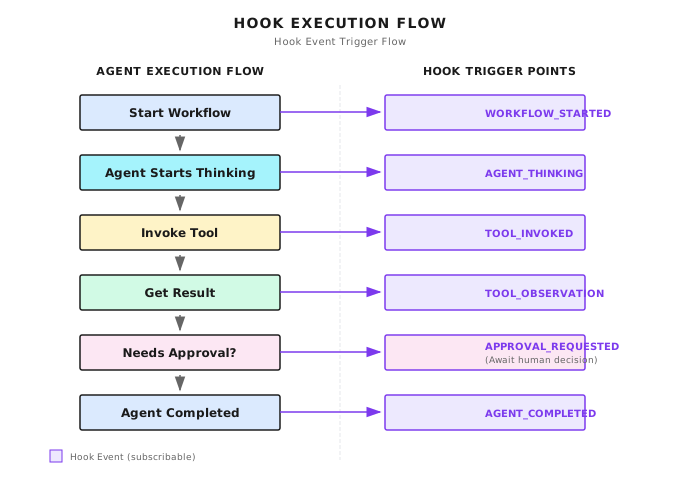
You can subscribe to any event point, do what you want -- log, send notifications, pause the flow, request human approval.
6.2 Shannon's Event Type System
Shannon defines a complete set of event types. I'll categorize them:
Workflow Lifecycle
StreamEventWorkflowStarted   = "WORKFLOW_STARTED"
StreamEventWorkflowCompleted = "WORKFLOW_COMPLETED"
StreamEventAgentStarted      = "AGENT_STARTED"
StreamEventAgentCompleted    = "AGENT_COMPLETED"
Execution State
StreamEventToolInvoked    = "TOOL_INVOKED"     // Tool call
StreamEventToolObs        = "TOOL_OBSERVATION" // Tool return
StreamEventAgentThinking  = "AGENT_THINKING"   // Thinking
StreamEventErrorOccurred  = "ERROR_OCCURRED"   // Error occurred
Workflow Control
StreamEventWorkflowPaused     = "WORKFLOW_PAUSED"     // Paused
StreamEventWorkflowResumed    = "WORKFLOW_RESUMED"    // Resumed
StreamEventWorkflowCancelled  = "WORKFLOW_CANCELLED"  // Cancelled
StreamEventApprovalRequested  = "APPROVAL_REQUESTED"  // Approval requested
StreamEventApprovalDecision   = "APPROVAL_DECISION"   // Approval result
LLM Events
StreamEventLLMPrompt  = "LLM_PROMPT"  // Content sent to LLM
StreamEventLLMPartial = "LLM_PARTIAL" // LLM incremental output
StreamEventLLMOutput  = "LLM_OUTPUT"  // LLM final output
Why break it down so finely?
Because different scenarios need different events. Frontend showing progress uses AGENT_THINKING, TOOL_INVOKED; debugging LLM uses LLM_PROMPT, LLM_OUTPUT; auditing uses WORKFLOW_COMPLETED.
6.3 How Are Events Emitted?
Each event looks like this:
type EmitTaskUpdateInput struct {
    WorkflowID string                 // Which workflow it's associated with
    EventType  StreamEventType        // What type of event
    AgentID    string                 // Which Agent emitted it
    Message    string                 // Human-readable description
    Timestamp  time.Time              // When
    Payload    map[string]interface{} // Additional data
}
Sending logic:
func EmitTaskUpdate(ctx context.Context, in EmitTaskUpdateInput) error {
    // 1. Write log
    logger.Info("streaming event",
        "workflow_id", in.WorkflowID,
        "type", string(in.EventType),
        "message", in.Message,
    )

    // 2. Publish to stream
    streaming.Get().Publish(in.WorkflowID, streaming.Event{
        WorkflowID: in.WorkflowID,
        Type:       string(in.EventType),
        Message:    in.Message,
        Timestamp:  in.Timestamp,
    })

    return nil
}
Note this is dual publishing: writes to log and publishes to stream simultaneously. Logs for debugging, stream for real-time push to frontend.
6.4 Streaming Event Manager
Shannon uses Redis Streams as the event transport layer. Why Redis Streams?
- High throughput: Can handle hundreds of thousands of messages per second
- Persistence: Messages won't be lost
- Consumer groups: Multiple consumers can share the load
Manager structure:
type Manager struct {
    redis       *redis.Client
    dbClient    *db.Client     // PostgreSQL
    subscribers map[string]map[chan Event]*subscription
    capacity    int            // Capacity limit
}
Publishing Events
func (m *Manager) Publish(workflowID string, evt Event) {
    if m.redis != nil {
        // 1. Increment sequence number (guarantees ordering)
        seq, _ := m.redis.Incr(ctx, m.seqKey(workflowID)).Result()
        evt.Seq = uint64(seq)

        // 2. Write to Redis Stream, auto-trim old events
        m.redis.XAdd(ctx, &redis.XAddArgs{
            Stream: m.streamKey(workflowID),
            MaxLen: int64(m.capacity),  // Capacity limit
            Approx: true,
            Values: eventData,
        })

        // 3. Set TTL (auto-cleanup after 24 hours)
        m.redis.Expire(ctx, streamKey, 24*time.Hour)
    }

    // 4. Persist important events to PostgreSQL
    if shouldPersistEvent(evt.Type) {
        select {
        case m.persistCh <- eventLog:
        default:
            // If queue is full, drop it, don't block main flow
        }
    }
}
Several key design points:
- Sequence number: Ensures events are ordered
- Capacity limit: Prevents Stream from growing infinitely
- TTL: Auto-cleanup after 24 hours
- Non-blocking persistence: If queue is full, drop it, don't slow down main flow
Which Events to Persist?
func shouldPersistEvent(eventType string) bool {
    switch eventType {
    // Need to persist: important events
    case "WORKFLOW_COMPLETED", "WORKFLOW_FAILED",
         "TOOL_INVOKED", "TOOL_OBSERVATION",
         "LLM_OUTPUT", "BUDGET_THRESHOLD":
        return true

    // Don't persist: temporary events
    case "LLM_PARTIAL", "HEARTBEAT", "PING":
        return false

    // Default persist (conservative strategy)
    default:
        return true
    }
}
LLM_PARTIAL is incremental output, potentially dozens per second, no point persisting. WORKFLOW_COMPLETED is the final result, must be stored.
6.5 Workflow Control: Pause/Resume/Cancel
This is one of the most powerful features of the Hooks system: runtime workflow control.
Shannon uses Temporal Signal to implement this. Signal is a Temporal feature that can send messages to running workflows.
Signal Handler
type SignalHandler struct {
    State      *WorkflowControlState
    WorkflowID string
}

func (h *SignalHandler) Setup(ctx workflow.Context) {
    h.State = &WorkflowControlState{}

    // Register three signal channels
    pauseCh := workflow.GetSignalChannel(ctx, SignalPause)
    resumeCh := workflow.GetSignalChannel(ctx, SignalResume)
    cancelCh := workflow.GetSignalChannel(ctx, SignalCancel)

    // Background goroutine listening for signals
    workflow.Go(ctx, func(gCtx workflow.Context) {
        for {
            sel := workflow.NewSelector(gCtx)

            sel.AddReceive(pauseCh, func(c workflow.ReceiveChannel, more bool) {
                var req PauseRequest
                c.Receive(gCtx, &req)
                h.handlePause(gCtx, req)
            })

            sel.AddReceive(resumeCh, func(c workflow.ReceiveChannel, more bool) {
                var req ResumeRequest
                c.Receive(gCtx, &req)
                h.handleResume(gCtx, req)
            })

            sel.AddReceive(cancelCh, func(c workflow.ReceiveChannel, more bool) {
                var req CancelRequest
                c.Receive(gCtx, &req)
                h.handleCancel(gCtx, req)
            })

            sel.Select(gCtx)
        }
    })
}
Pause and Resume
func (h *SignalHandler) handlePause(ctx workflow.Context, req PauseRequest) {
    if h.State.IsPaused {
        return  // Already paused
    }

    h.State.IsPaused = true
    h.State.PauseReason = req.Reason

    // Send event to notify frontend
    emitEvent(ctx, StreamEventWorkflowPausing, "Workflow pausing: "+req.Reason)

    // Propagate to all child workflows
    h.propagateSignalToChildren(ctx, SignalPause, req)
}
Checkpoint Mechanism
Workflows can't pause at arbitrary positions, only at "checkpoints." This is a Temporal limitation, but also a reasonable design.
func (h *SignalHandler) CheckPausePoint(ctx workflow.Context, checkpoint string) error {
    // Yield execution, ensure signals are processed
    _ = workflow.Sleep(ctx, 0)

    // Check if cancelled
    if h.State.IsCancelled {
        return temporal.NewCanceledError("workflow cancelled")
    }

    // Check if paused
    if h.State.IsPaused {
        emitEvent(ctx, StreamEventWorkflowPaused, "Paused at: "+checkpoint)

        // Block waiting for resume (not polling!)
        _ = workflow.Await(ctx, func() bool {
            return !h.State.IsPaused || h.State.IsCancelled
        })
    }

    return nil
}
Usage:
func MyWorkflow(ctx workflow.Context, input Input) error {
    handler := &control.SignalHandler{...}
    handler.Setup(ctx)

    // Checkpoint 1
    if err := handler.CheckPausePoint(ctx, "before_research"); err != nil {
        return err
    }
    doResearch(ctx)

    // Checkpoint 2
    if err := handler.CheckPausePoint(ctx, "before_synthesis"); err != nil {
        return err
    }
    doSynthesis(ctx)

    return nil
}
Insert checkpoints before each critical step, and users can pause the workflow at these positions.
6.6 Human Approval Hook
For high-risk operations, you might want the Agent to ask a human first.
Approval Policy
type ApprovalPolicy struct {
    ComplexityThreshold float64  // Require approval if complexity exceeds this value
    TokenBudgetExceeded bool     // Require approval if Token exceeds budget
    RequireForTools     []string // These tools require approval
}

func EvaluateApprovalPolicy(policy ApprovalPolicy, context map[string]interface{}) (bool, string) {
    // Check complexity
    if complexity := context["complexity_score"].(float64); complexity >= policy.ComplexityThreshold {
        return true, fmt.Sprintf("Complexity %.2f exceeds threshold", complexity)
    }

    // Check dangerous tools
    if tools := context["tools_to_use"].([]string); containsAny(tools, policy.RequireForTools) {
        return true, "Dangerous tool requires approval"
    }

    return false, ""
}
Requesting Approval
func RequestAndWaitApproval(ctx workflow.Context, input TaskInput, reason string) (*HumanApprovalResult, error) {
    // 1. Send approval request
    var approval HumanApprovalResult
    workflow.ExecuteActivity(ctx, "RequestApproval", HumanApprovalInput{
        SessionID:      input.SessionID,
        WorkflowID:     workflow.GetInfo(ctx).WorkflowExecution.ID,
        Query:          input.Query,
        Reason:         reason,
    }).Get(ctx, &approval)

    // 2. Send event to notify frontend
    emitEvent(ctx, StreamEventApprovalRequested, "Approval requested: "+reason)

    // 3. Wait for human decision (max 60 minutes)
    sigName := "human-approval-" + approval.ApprovalID
    ch := workflow.GetSignalChannel(ctx, sigName)
    timer := workflow.NewTimer(ctx, 60*time.Minute)

    var result HumanApprovalResult
    sel := workflow.NewSelector(ctx)
    sel.AddReceive(ch, func(c workflow.ReceiveChannel, more bool) {
        c.Receive(ctx, &result)
    })
    sel.AddFuture(timer, func(f workflow.Future) {
        result = HumanApprovalResult{Approved: false, Feedback: "timeout"}
    })
    sel.Select(ctx)

    // 4. Send result event
    decision := "denied"
    if result.Approved {
        decision = "approved"
    }
    emitEvent(ctx, StreamEventApprovalDecision, "Approval "+decision)

    return &result, nil
}
Usage:
func ResearchWorkflow(ctx workflow.Context, input TaskInput) error {
    // Evaluate if approval is needed
    needsApproval, reason := EvaluateApprovalPolicy(policy, context)

    if needsApproval {
        approval, err := RequestAndWaitApproval(ctx, input, reason)
        if err != nil {
            return err
        }

        if !approval.Approved {
            return fmt.Errorf("rejected: %s", approval.Feedback)
        }
    }

    // Continue execution...
    return executeResearch(ctx, input)
}
6.7 Hands-On: Token Consumption Monitoring Hook
Let's write a practical Hook: monitor Token consumption, warn when approaching budget.
type TokenUsageHook struct {
    WarningThreshold  float64 // 80%
    CriticalThreshold float64 // 95%
    TotalBudget       int
    CurrentUsage      int
}

func (h *TokenUsageHook) OnTokensUsed(ctx workflow.Context, tokensUsed int) error {
    h.CurrentUsage += tokensUsed
    ratio := float64(h.CurrentUsage) / float64(h.TotalBudget)

    if ratio >= h.CriticalThreshold {
        return emitEvent(ctx, StreamEventBudgetThreshold,
            fmt.Sprintf("CRITICAL: Token budget at %.0f%% (%d/%d)",
                ratio*100, h.CurrentUsage, h.TotalBudget),
            map[string]interface{}{"level": "critical", "ratio": ratio},
        )
    }

    if ratio >= h.WarningThreshold {
        return emitEvent(ctx, StreamEventBudgetThreshold,
            fmt.Sprintf("WARNING: Token budget at %.0f%%", ratio*100),
            map[string]interface{}{"level": "warning", "ratio": ratio},
        )
    }

    return nil
}
This Hook triggers after each LLM call, checking if Token consumption is approaching budget. Warning at 80%, critical warning at 95%.
6.8 Common Pitfalls
Pitfall 1: Blocking Hooks
Hook execution takes too long, slowing down main flow.
// Blocking - slows down main flow
result, err := publishEvent(ctx, event)
if err != nil {
    return err  // Stops on failure
}

// Non-blocking - recommended
select {
case eventCh <- event:
    // Success
default:
    logger.Warn("Event dropped - channel full")
}
Pitfall 2: Event Storm
Large volume of low-value events drowning important events.
Solution: Event tiering, selective persistence. LLM_PARTIAL not stored, WORKFLOW_COMPLETED must be stored.
Pitfall 3: State Inconsistency
Race condition between Signal handling and state checking.
Solution: Use workflow.Sleep(ctx, 0) before checking state to yield execution, ensuring Signals are processed.
Pitfall 4: Child Workflow Signal Loss
When parent workflow is paused, child workflows continue running.
Solution: Signal propagation mechanism.
func (h *SignalHandler) handlePause(ctx workflow.Context, req PauseRequest) {
    h.State.IsPaused = true
    // Propagate to all child workflows
    h.propagateSignalToChildren(ctx, SignalPause, req)
}
6.9 How Do Other Frameworks Do It?
| Framework | Hook Mechanism | Features |
|---|---|---|
| LangChain | Callbacks | on_llm_start, on_tool_end and other callbacks |
| LangGraph | Node hooks | Triggers on node enter/exit |
| CrewAI | Step callback | Callback after each Agent step |
| Claude Code | Hooks directory | Implemented with standalone scripts, communicates via stdin/stdout |
| Shannon | Temporal Signal + Redis Streams | Supports pause/resume/cancel |
Differences are mainly in:
| Dimension | Simple Callbacks | Temporal Signal Pattern |
|---|---|---|
| State management | In memory | Persisted |
| Failure recovery | Lost | Recoverable |
| Pause/Resume | Hard to implement | Native support |
| Complexity | Low | High |
If you only need logging and simple notifications, Callbacks are sufficient. If you need long-running, interruptible, recoverable workflows, Temporal Signal pattern is more suitable.
6.10 Claude Code's Hooks: A Lightweight Implementation
Claude Code has a simple but practical Hooks mechanism worth referencing.
It defines Hooks in the .claude/hooks/ directory, implemented with standalone scripts:
.claude/
└── hooks/
    ├── pre-tool-use.sh     # Before tool call
    ├── post-tool-use.sh    # After tool call
    ├── notification.sh     # Notify user
    └── stop.sh             # When Agent stops
The invocation method is simple: pass event data via stdin, script processes it and returns.
# pre-tool-use.sh example
#!/bin/bash
# Read JSON input
read -r input
tool_name=$(echo "$input" | jq -r '.tool')

# Log
echo "$(date): Tool called: $tool_name" >> ~/.claude/hooks.log

# If it's a dangerous tool, block execution
if [[ "$tool_name" == "shell_execute" ]]; then
    echo '{"action": "block", "reason": "Shell execution not allowed"}'
    exit 1
fi

# Allow execution
echo '{"action": "allow"}'
Advantages of this design:
| Advantage | Explanation |
|---|---|
| Language agnostic | Any language that can write scripts works |
| Isolation | Hook is a separate process, crash doesn't affect main program |
| Simple | No need to learn framework, just know how to write scripts |
Disadvantages are performance overhead (starting a process for each call) and limited functionality (can't persist state).
Chapter Summary
- Hooks solve three problems: See (observable), Manage (controllable), Extend (extensible)
- Event tiering is important -- not all events need to be persisted,
LLM_PARTIALnot stored,WORKFLOW_COMPLETEDmust be stored - Pause/Resume uses Temporal Signal -- not polling, it's real blocking wait
- Human approval is a safety guardrail -- triggers based on policy, supports auto-reject on timeout
- Hooks should be non-blocking -- if queue is full, drop it, can't slow down main flow
Shannon Lab (10-Minute Quickstart)
This section helps you map the concepts from this chapter to Shannon source code in 10 minutes.
Required Reading (1 file)
streaming/manager.go: Look atPublishmethod andshouldPersistEventfunction, understand event publishing and tiering logic
Optional Deep Dives (2, pick by interest)
control/handler.go: See howSignalHandlerhandles pause/resume/cancelcontrol/signals.go: See signal type definitions
Exercises
Exercise 1: Design Event Tiering
Assuming you have the following event types, which should be persisted? Why?
USER_MESSAGE_RECEIVEDLLM_TOKEN_GENERATEDTOOL_EXECUTION_STARTEDTOOL_EXECUTION_COMPLETEDAGENT_ERRORHEARTBEAT
Exercise 2: Implement a Simple Hook
In a language you're comfortable with, implement a "tool call logging" Hook:
- Log each tool call: time, tool name, parameter summary
- Write to file (JSON Lines format)
- Consider: Should this Hook be synchronous or asynchronous? Why?
Exercise 3 (Advanced): Design Approval Policy
Design an approval policy for a "research assistant" Agent:
- What situations require human approval?
- How should approval timeout be handled (auto-approve vs auto-reject)?
- How to avoid frequently disturbing users?
Further Reading
- Shannon Streaming Manager - Code implementation
- Temporal Signals Documentation - Temporal signal mechanism
- Redis Streams Documentation - Redis Streams introduction
- Claude Code Hooks - Claude Code's Hooks documentation
Next Chapter Preview
Part 2 "Tools and Extensions" ends here.
We learned four things:
- Tool Calling: Letting Agents "take action"
- MCP Protocol: "USB port" for tools
- Skills: Packaging role configurations
- Hooks: Observing and controlling execution
Next, we enter Part 3 "Context and Memory."
During Agent execution, a large amount of information is generated, but LLM's context window is limited. How do you fit the most useful information into limited space?
Next chapter we'll discuss Context Window Management.