Chapter 16: Handoff Mechanism
Handoff enables precise data and state transfer between Agents—from simple context injection to complex P2P message protocols, choosing the right mechanism matters more than pursuing complete functionality.
Note: Handoff mechanism should be chosen based on actual collaboration complexity. Simple chain dependencies work fine with context injection—don't introduce unnecessary Workspace or P2P messaging systems just for "architectural completeness."
Quick Track (Master the core in 5 minutes)
- Three layers of handoff: previous_results (simple) -> Workspace (shared) -> P2P (negotiation)
- Plan IO declares Produces/Consumes, letting orchestrator understand data dependencies
- Dependency waiting uses incremental timeout checks, balancing response speed and resource consumption
- Use workflow.Now() when writing to workspace to ensure determinism
- Most scenarios only need the first two layers; P2P is for scenarios that truly need bidirectional communication
10-minute path: 16.1-16.3 -> 16.5 -> Shannon Lab
Opening Scenario: Data Flow in Financial Analysis
You have Agent A collecting Tesla's financial data, Agent B calculating growth rates based on that data, Agent C calculating profit margins, and finally Agent D synthesizing analysis of all three results.
Questions arise:
- How does B get A's results?
- Can C and B run in parallel?
- How does D know both B and C are done?
In simple scenarios, stuffing A's output into B's context is enough. But for more complex multi-Agent collaboration—data flowing between multiple Agents, some needing to wait, some running in parallel, some needing mutual negotiation—you need a systematic handoff mechanism.
Handoff solves exactly this—enabling precise and reliable data and state transfer between Agents.
16.1 Three Handoff Methods
From simple to complex, there are three layers:
| Layer | Mechanism | Use Case | Complexity |
|---|---|---|---|
| Dependency injection | previous_results context | Simple chain dependencies | Low |
| Workspace | Workspace + Topic | Topic-driven data sharing | Medium |
| P2P messaging | Mailbox + protocol | Complex inter-Agent coordination | High |
Most scenarios only need the first two. P2P messaging is for truly complex coordination scenarios—like when Agents need to negotiate, bid, or dynamically delegate tasks.
Selection Principles
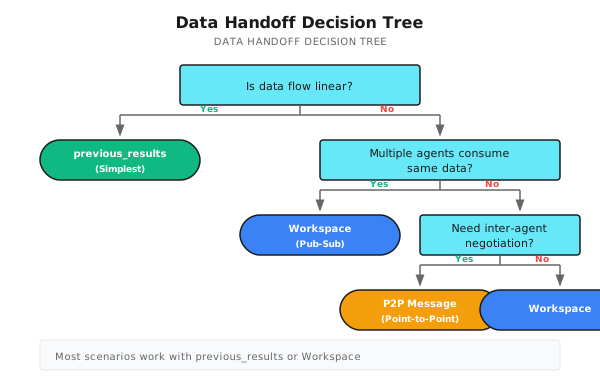
16.2 Plan IO: Declaring Data Flow
During task decomposition, you can declare what each subtask "produces" and "needs." This lets the orchestrator understand data flow and make correct scheduling decisions.
Data Structures and Examples
// Subtask defines task data flow dependencies
type Subtask struct {
    ID           string
    Description  string
    Dependencies []string  // Task-level dependency: prerequisite tasks to wait for (e.g., "must wait for A to finish before running B")
    Produces     []string  // Data topics it produces
    Consumes     []string  // Data topics it needs (e.g., "B needs data A produces")
}

// Example: Financial report analysis task decomposition
// fetch_data: produces=["financial_data"], consumes=[]
// calc_growth: produces=["growth_metrics"], consumes=["financial_data"], dependencies=["fetch_data"]
// calc_margin: produces=["margin_metrics"], consumes=["financial_data"], dependencies=["fetch_data"]
// synthesis:   produces=[], consumes=["growth_metrics","margin_metrics"], dependencies=["calc_growth","calc_margin"]
Dependencies vs Consumes: Usually used together, but can be separate. For example: after A produces data, B and C can consume it in parallel (no ordering dependency), but both depend on A's data (data dependency).
Data Flow Diagram
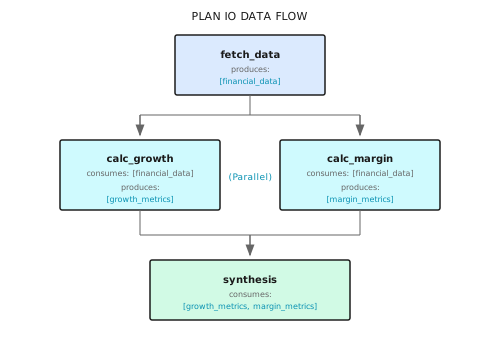
When the orchestrator sees this Plan, it knows:
fetch_datacan execute immediatelycalc_growthandcalc_margincan run in parallel, both wait forfetch_datato completesynthesiswaits for both to complete
16.3 Previous Results Injection (Simplest Handoff)
The most direct handoff method: stuff previous Agent results directly into subsequent Agent context.
Code Reference
The following code shows how Shannon implements previous results injection. Core design point: automatically extract numeric results for easier calculation tasks.
// Build previous results
if len(childResults) > 0 {
    previousResults := make(map[string]interface{})
    for j, prevResult := range childResults {
        if j < i {
            resultMap := map[string]interface{}{
                "response":      prevResult.Response,
                "tokens":        prevResult.TokensUsed,
                "success":       prevResult.Success,
                "tools_used":    prevResult.ToolsUsed,
            }

            // Auto-extract numeric results (convenient for calculation tasks)
            if numVal, ok := ParseNumericValue(prevResult.Response); ok {
                resultMap["numeric_value"] = numVal
            }

            previousResults[decomp.Subtasks[j].ID] = resultMap
        }
    }
    childCtx["previous_results"] = previousResults
}
Context Agent Receives
{
  "role": "analyst",
  "task_id": "synthesis",
  "previous_results": {
    "fetch_data": {
      "response": "Tesla 2024 revenue $123.4 billion, net profit $8.9 billion...",
      "tokens": 500,
      "success": true
    },
    "calc_growth": {
      "response": "Revenue growth rate is 15.3%",
      "tokens": 200,
      "success": true,
      "numeric_value": 15.3
    },
    "calc_margin": {
      "response": "Net profit margin is 7.2%",
      "tokens": 180,
      "success": true,
      "numeric_value": 7.2
    }
  }
}
Subsequent Agents can directly use data in previous_results. The numeric_value field is particularly useful—calculation tasks can directly get numbers without parsing text.
Use Case Suitability
| Scenario | Suitable | Reason |
|---|---|---|
| Linear chain tasks | Suitable | A -> B -> C, clear data flow |
| Fan-out parallel | Suitable | A -> [B, C, D], B/C/D all get A's result |
| Fan-in convergence | Suitable | [A, B, C] -> D, D gets all previous results |
| Dynamic data sharing | Not suitable | New data generated during task execution needs sharing |
| Inter-Agent negotiation | Not suitable | Needs bidirectional communication |
16.4 Workspace System
When data flow is more complex—multiple Agents producing data, multiple Agents consuming data, or needing to dynamically share data during task execution—use workspace.
Core Concepts
Workspace is a Redis-based publish-subscribe system:
- Topic: Logical data classification, e.g.,
financial_data,growth_metrics - Entry: One data item written to a topic
- Seq (sequence number): Globally incrementing, used for incremental reads
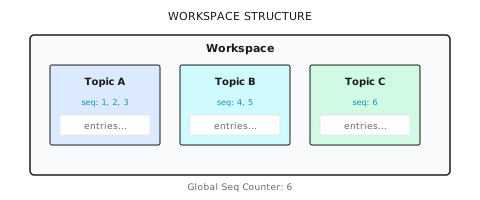
Read/Write Operations
The following code from Shannon's p2p.go shows workspace read/write implementation:
// ========== Write Data ==========
type WorkspaceAppendInput struct {
    WorkflowID string
    Topic      string                 // Topic name
    Entry      map[string]interface{} // Data entry (limit 1MB)
    Timestamp  time.Time              // Workflow timestamp (ensures deterministic replay)
}

func (a *Activities) WorkspaceAppend(ctx context.Context, in WorkspaceAppendInput) (WorkspaceAppendResult, error) {
    rc := a.sessionManager.RedisWrapper().GetClient()

    // Global sequence number (increments across topics)
    seqKey := fmt.Sprintf("wf:%s:ws:seq", in.WorkflowID)
    seq := rc.Incr(ctx, seqKey).Val()

    // Write to topic list, set 48 hour TTL
    listKey := fmt.Sprintf("wf:%s:ws:%s", in.WorkflowID, in.Topic)
    entry := map[string]interface{}{"seq": seq, "topic": in.Topic, "entry": in.Entry, "ts": in.Timestamp.UnixNano()}
    rc.RPush(ctx, listKey, mustMarshal(entry))
    rc.Expire(ctx, listKey, 48*time.Hour)

    return WorkspaceAppendResult{Seq: uint64(seq)}, nil
}

// ========== Read Data (supports incremental) ==========
type WorkspaceListInput struct {
    WorkflowID string
    Topic      string
    SinceSeq   uint64  // Only return entries after this sequence number (supports incremental read)
    Limit      int64   // Default 200
}

func (a *Activities) WorkspaceList(ctx context.Context, in WorkspaceListInput) ([]WorkspaceEntry, error) {
    rc := a.sessionManager.RedisWrapper().GetClient()
    vals, _ := rc.LRange(ctx, fmt.Sprintf("wf:%s:ws:%s", in.WorkflowID, in.Topic), -in.Limit, -1).Result()

    out := make([]WorkspaceEntry, 0)
    for _, v := range vals {
        var e WorkspaceEntry
        if json.Unmarshal([]byte(v), &e) == nil && e.Seq > in.SinceSeq {
            out = append(out, e)  // Incremental filter
        }
    }
    return out, nil
}
SinceSeq Purpose
SinceSeq supports incremental reads—Agent only gets new data since its last read:
Timeline:
  T1: Agent A writes seq=1
  T2: Agent B reads (SinceSeq=0) -> gets seq=1
  T3: Agent A writes seq=2
  T4: Agent B reads (SinceSeq=1) -> only gets seq=2 (incremental)
This is useful for long-running collaboration—Agent can continuously poll for new data instead of getting full volume each time.
16.5 P2P Dependency Synchronization
When Agent B needs to wait for Agent A's data, use exponential backoff polling.
Why Not Fixed Interval?
| Strategy | Problem |
|---|---|
| Fixed 1 second | High-frequency polling generates many useless queries, wastes resources |
| Fixed 30 seconds | Slow response, long user wait time |
| Event-driven | Needs additional message queue, increases complexity |
Exponential backoff is the compromise: fast initial checks, gradually slowing down, neither wasting resources nor taking too long to respond when data is ready.
Implementation Code
The following code shows Shannon's dependency waiting logic in Hybrid execution mode:
// waitForDependencies waits for all dependencies to complete, using incremental timeout
func waitForDependencies(
    ctx workflow.Context,
    dependencies []string,
    completedTasks map[string]bool,
    timeout time.Duration,
    checkInterval time.Duration,
) bool {
    logger := workflow.GetLogger(ctx)

    // Default check interval: 30 seconds
    if checkInterval == 0 {
        checkInterval = 30 * time.Second
    }

    startTime := workflow.Now(ctx)
    deadline := startTime.Add(timeout)

    for workflow.Now(ctx).Before(deadline) {
        // Calculate wait time: minimum of check interval and remaining time
        remaining := deadline.Sub(workflow.Now(ctx))
        waitTime := checkInterval
        if remaining < waitTime {
            waitTime = remaining
        }

        // Temporal's AwaitWithTimeout: wait for condition or timeout
        ok, err := workflow.AwaitWithTimeout(ctx, waitTime, func() bool {
            for _, depID := range dependencies {
                if !completedTasks[depID] {
                    return false
                }
            }
            return true
        })

        if err != nil {
            logger.Debug("Context cancelled during dependency wait")
            return false
        }

        if ok {
            return true  // Dependencies satisfied
        }

        // Continue next check iteration
        logger.Debug("Dependency check iteration",
            "dependencies", dependencies,
            "elapsed", workflow.Now(ctx).Sub(startTime),
        )
    }

    logger.Warn("Dependency wait timeout", "dependencies", dependencies)
    return false
}
Backoff Time Sequence
Shannon's implementation uses fixed intervals (30 seconds), but classic exponential backoff looks like this:
Attempt 1: wait 1 second
Attempt 2: wait 2 seconds
Attempt 3: wait 4 seconds
Attempt 4: wait 8 seconds
Attempt 5: wait 16 seconds
Attempt 6+: wait 30 seconds (ceiling)

Total wait time (6 minute timeout):
  Fast check period (first 30 seconds): ~5 attempts
  Stable period (remaining 5.5 minutes): ~11 attempts
Producing Data
After Agent completes, write results to workspace for other Agents to consume:
// Produce results to workspace
if len(subtask.Produces) > 0 {
    for _, topic := range subtask.Produces {
        WorkspaceAppend(ctx, WorkspaceAppendInput{
            WorkflowID: workflowID,
            Topic:      topic,
            Entry: map[string]interface{}{
                "subtask_id": subtask.ID,
                "summary":    result.Response,
            },
            Timestamp: workflow.Now(ctx),
        })

        // Notify Agents waiting for this topic (non-blocking channel)
        if ch, ok := topicChans[topic]; ok {
            select {
            case ch <- true:
            default:  // Channel full or no listener, skip
            }
        }
    }
}
16.6 P2P Messaging System
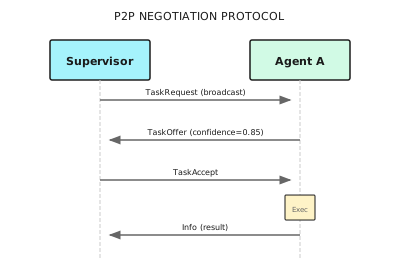
Sometimes Agents need more flexible communication, not just "waiting for data." For example:
- Task request: "Who can handle this data analysis?"
- Offer response: "I can, estimated 2 minutes to complete"
- Accept confirmation: "OK, assigned to you"
P2P Messaging System Implementation
The following code from Shannon's p2p.go shows inter-Agent message sending and negotiation protocol:
// ========== Message Type Definition ==========
type MessageType string
const (
    MessageTypeRequest    MessageType = "request"     // Task request
    MessageTypeOffer      MessageType = "offer"       // Offer response
    MessageTypeAccept     MessageType = "accept"      // Accept confirmation
    MessageTypeDelegation MessageType = "delegation"  // Delegation
    MessageTypeInfo       MessageType = "info"        // Information notification
)

// ========== Message Sending ==========
type SendAgentMessageInput struct {
    WorkflowID string
    From, To   string              // Sender/receiver Agent ID
    Type       MessageType
    Payload    map[string]interface{}  // Limit 1MB
    Timestamp  time.Time               // Workflow timestamp
}

func (a *Activities) SendAgentMessage(ctx context.Context, in SendAgentMessageInput) (SendAgentMessageResult, error) {
    rc := a.sessionManager.RedisWrapper().GetClient()

    // Receiver's message queue (mailbox)
    listKey := fmt.Sprintf("wf:%s:mbox:%s:msgs", in.WorkflowID, in.To)
    seq := rc.Incr(ctx, fmt.Sprintf("wf:%s:mbox:%s:seq", in.WorkflowID, in.To)).Val()

    msg := map[string]interface{}{"seq": seq, "from": in.From, "to": in.To, "type": string(in.Type), "payload": in.Payload}
    rc.RPush(ctx, listKey, mustMarshal(msg))
    rc.Expire(ctx, listKey, 48*time.Hour)

    return SendAgentMessageResult{Seq: uint64(seq)}, nil
}

// ========== Task Negotiation Protocol (Advanced Example) ==========
type TaskRequest struct {  // Supervisor broadcasts request
    TaskID, Description string
    Skills              []string  // Required skills
}
type TaskOffer struct {    // Agent responds with offer
    RequestID, AgentID string
    Confidence         float64   // Completion confidence
}
type TaskAccept struct {   // Supervisor confirms assignment
    RequestID, AgentID string
}
Negotiation Flow Diagram
When to Use P2P Messaging?
| Scenario | Use Workspace | Use P2P Messaging |
|---|---|---|
| Data sharing | Suitable | Over-engineering |
| Waiting for dependencies | Suitable | Over-engineering |
| Task negotiation | Not suitable | Suitable |
| Dynamic delegation | Not suitable | Suitable |
| State synchronization | Depends | Depends |
Most scenarios don't need P2P messaging. Only consider it when Agents need bidirectional interaction (not just data flow).
16.7 Hybrid Execution and Dependency Passing
Shannon's Hybrid execution mode combines parallelism and dependency management, automatically handling data handoff.
HybridConfig and Dependency Result Passing
type HybridConfig struct {
    MaxConcurrency          int           // Max concurrency
    DependencyWaitTimeout   time.Duration // Dependency wait timeout
    DependencyCheckInterval time.Duration // Check interval (default 30s)
    PassDependencyResults   bool          // Whether to pass dependency results
}

// When PassDependencyResults=true, automatically inject dependency task results
if config.PassDependencyResults && len(task.Dependencies) > 0 {
    depResults := make(map[string]interface{})
    for _, depID := range task.Dependencies {
        if result, ok := taskResults[depID]; ok {
            depResults[depID] = map[string]interface{}{
                "response": result.Response, "tokens": result.TokensUsed, "success": result.Success,
            }
        }
    }
    taskContext["dependency_results"] = depResults
}
// Subsequent task receives: {"dependency_results": {"calc_growth": {"response": "...", "tokens": 200}}}
16.8 Producer Set Validation
A common problem area: Agent declares consuming a topic, but no Agent produces that topic.
Problem Scenario
{
  "subtasks": [
    {"id": "A", "produces": ["data_a"]},
    {"id": "B", "consumes": ["missing_data"]}  // Nobody produces this!
  ]
}
Without validation, B will wait indefinitely for missing_data, eventually timing out.
Solution: Data Flow Validation
Pre-build producer set, validate during task decomposition to avoid runtime discovery:
func ValidateDataFlow(subtasks []Subtask) error {
    // Option A: Runtime check (lenient) — skip non-existent topics
    producesSet := make(map[string]struct{})
    for _, s := range subtasks {
        for _, t := range s.Produces {
            producesSet[t] = struct{}{}
        }
    }
    // When waiting: if _, ok := producesSet[topic]; !ok { logger.Warn("skip"); continue }

    // Option B: Pre-launch validation (strict) — error on problems
    consumesSet := make(map[string][]string)  // topic -> consumer IDs
    for _, s := range subtasks {
        for _, t := range s.Consumes {
            consumesSet[t] = append(consumesSet[t], s.ID)
        }
    }
    var errs []string
    for topic, consumers := range consumesSet {
        if _, ok := producesSet[topic]; !ok {
            errs = append(errs, fmt.Sprintf("Topic '%s' consumed by [%s] but no producer", topic, strings.Join(consumers, ", ")))
        }
    }
    if len(errs) > 0 {
        return fmt.Errorf("data flow validation failed:\n%s", strings.Join(errs, "\n"))
    }
    return nil
}
16.9 Common Pitfalls
Common Problems and Solutions
// ========== Pitfall 1: Circular dependency (A waits for B, B waits for A) ==========
// Solution: Use Kahn's algorithm to detect cycles
func DetectCycle(subtasks []Subtask) error {
    inDegree := make(map[string]int)
    for _, s := range subtasks {
        for _, dep := range s.Dependencies { inDegree[dep]++ }
    }
    queue := []string{}
    for _, s := range subtasks {
        if inDegree[s.ID] == 0 { queue = append(queue, s.ID) }
    }
    // Topological sort, if visited != len(subtasks) then cycle exists
    // ...
}

// ========== Pitfall 2: Topic name inconsistency (case-sensitive) ==========
// Solution: Normalize topic names
func NormalizeTopic(topic string) string {
    return strings.ReplaceAll(strings.ToLower(strings.TrimSpace(topic)), " ", "_")
}

// ========== Pitfall 3: Entry too large (exceeds 1MB) ==========
// Wrong: Entry: map[string]interface{}{"full_report": veryLongReport}
// Correct: Store in S3, only pass reference
// Entry: map[string]interface{}{"report_ref": "s3://bucket/reports/12345.json"}

// ========== Pitfall 4: Non-deterministic timestamp ==========
// Wrong: time.Now().UnixNano()          // Breaks Temporal deterministic replay
// Correct: workflow.Now(ctx).UnixNano()   // Deterministic

// ========== Pitfall 5: Forgot to set timeout ==========
// Solution: Always set timeout
deadline := workflow.Now(ctx).Add(6 * time.Minute)
for workflow.Now(ctx).Before(deadline) {
    if checkDependency() { break }
    workflow.Sleep(ctx, 30*time.Second)
}
16.10 Configuration
P2P coordination is controlled through configuration:
# config/shannon.yaml
workflows:
  p2p:
    enabled: true          # Off by default (most scenarios don't need it)
    timeout_seconds: 360   # Timeout should be reasonable: too short fails easily, too long wastes time
  hybrid:
    dependency_timeout: 360
    max_concurrency: 5
    pass_dependency_results: true
  sequential:
    pass_results: true
    extract_numeric: true  # Auto-extract numbers, convenient for calculation tasks
Configuration principle: Enable features based on actual needs, don't "want everything."
16.11 Framework Comparison
| Feature | Shannon | LangGraph | AutoGen | CrewAI |
|---|---|---|---|---|
| Dependency injection | previous_results | State passing | Message History | Task Context |
| Topic workspace | Redis Pub/Sub | No built-in | No built-in | No built-in |
| P2P messaging | Mailbox system | Channel | GroupChat | No built-in |
| Dependency waiting | AwaitWithTimeout | Manual implementation | Manual implementation | Sequential mode |
| Data size limit | 1MB | Unlimited | Unlimited | Unlimited |
| Deterministic timestamp | workflow.Now | No | No | No |
Selection recommendations:
- Simple scenarios: Any framework works, choose what you're familiar with
- Complex data flow: Shannon's Workspace system is most complete
- Agent negotiation: Shannon's P2P messaging or AutoGen's GroupChat
- Production-grade reliability: Shannon + Temporal provides strongest guarantees
Summary
- Three-layer mechanism: previous_results (simple) -> Workspace (medium) -> P2P messaging (complex), choose as needed
- Plan IO: Declare data flow via Produces/Consumes, let orchestrator understand dependencies
- Exponential backoff: Dependency waiting uses exponential backoff or fixed interval polling, balancing response speed and resource consumption
- Producer validation: Pre-check data flow completeness, avoid waiting for non-existent topics
- Determinism principle: Use workflow.Now() not time.Now(), ensure Temporal replay correctness
Shannon Lab (10-minute hands-on)
This section helps you map this chapter's concepts to Shannon source code in 10 minutes.
Required Reading (1 file)
execution/hybrid.go: Look atExecuteHybridfunction, understand howwaitForDependenciesimplements dependency waiting, howPassDependencyResultspasses results, concurrency control uses Semaphore not Mutex
Optional Deep Dives (2 files, pick based on interest)
activities/p2p.go: Look at SendAgentMessage, WorkspaceAppend functions, understand Redis data structure design (List + global sequence number) and TTL settingsstrategies/dag.go: Look at DAGWorkflow, understand how to select execution mode based onExecutionStrategy, how to detect dependencies
Exercises
Exercise 1: Design Data Flow
Scenario: User asks "Compare Apple and Microsoft's 2024 financial performance"
Design a Plan including:
- What subtasks?
- Each task's Produces/Consumes?
- Which can run in parallel?
Hint: Consider data acquisition, metric calculation, comparison analysis as three phases.
Exercise 2: Implement Cycle Detection
Using Go or your preferred language, implement:
- Parse subtask list from JSON Plan
- Build dependency graph
- Detect circular dependencies
Test cases:
// No cycle
[{"id": "A", "dependencies": []}, {"id": "B", "dependencies": ["A"]}]

// Has cycle
[{"id": "A", "dependencies": ["B"]}, {"id": "B", "dependencies": ["A"]}]
Exercise 3: Design Workspace Schema
Design Workspace Topic structure for "competitive analysis" scenario:
- What data topics?
- Entry structure for each topic?
- How to support incremental updates?
Hint: Consider competitor list, competitor details, comparison matrix, final report, etc.
Want to Go Deeper?
- Redis Pub/Sub - Workspace underlying implementation
- Temporal Signals & Queries - P2P messaging workflow layer implementation
- DAG Scheduling Algorithms - Theoretical foundation for dependency scheduling
- Contract Net Protocol - Academic background for task negotiation protocols
Part 5 Summary
Four chapters covering complete multi-Agent orchestration:
| Chapter | Core Concept | Shannon Mapping |
|---|---|---|
| Ch13 Orchestration Fundamentals | Orchestrator's 4 responsibilities, routing decisions | orchestrator_router.go |
| Ch14 DAG Workflows | Parallel/Sequential/Hybrid three modes | strategies/dag.go |
| Ch15 Supervisor | Mailbox system, dynamic teams, smart fault tolerance | supervisor_workflow.go |
| Ch16 Handoff | Data flow declaration, workspace, P2P coordination | activities/p2p.go |
These four components work together:
User Request
    |
    v
+------------------+
|   Orchestrator   |  <- Routing decision: select execution mode
+--------+---------+
         |
    +----+----+
    v         v
+-------+  +----------+
|  DAG  |  |Supervisor|  <- Execution engines
+---+---+  +----+-----+
    |           |
    +-----+-----+
          v
    +----------+
    | Handoff  |  <- Task handoff: data transfer
    +----------+
          |
          v
    +----------+
    | Synthesis|  <- Result synthesis
    +----------+
Next Chapter Preview
Part 6 enters Advanced Reasoning Patterns:
- Chapter 17: Tree-of-Thoughts—When linear thinking isn't enough, how to explore multiple reasoning paths
- Chapter 18: Debate Pattern—Let Agents challenge each other, improve answer quality through debate
- Chapter 19: Research Synthesis—How to synthesize multi-source information into high-quality research reports
From "multiple Agents doing things" to "multiple Agents thinking."