Chapter 29: Background Agents
Background Agents let tasks run independently from user sessions -- scheduled execution, continuous monitoring, automatic failure recovery. This is a key step in evolving Agents from "tools" to "employees," but it also means losing real-time human supervision, requiring budget controls and safety measures to be designed in from the start.
Quick Track (Master the core in 5 minutes)
- Core value: Decouple user sessions from task execution, support long-running and scheduled tasks
- Temporal trio: Schedule (timing), Workflow (logic), Activity (execution)
- Unattended operation requires preset: Token budget caps + execution time limits + alert thresholds
- State queries: Use Query for real-time progress, Signal for dynamic behavior adjustment
- Failure recovery: RetryPolicy with exponential backoff + max retries + human intervention fallback
10-Minute Path: 29.1-29.3 -> 29.5 -> Shannon Lab
Your user says: "Generate an AI industry news digest for me every morning at 9 AM."
The traditional way, you'd have to tell them to set an alarm, open the webpage daily to trigger it. Or write a cron job, but that needs a server, plus handling failure retries, log monitoring...
Background Agents change this game. Users only need to say one sentence, and the system will:
- Create a scheduled task
- Automatically trigger Agent execution at 9 AM every day
- Send notification when task completes
- Auto-retry and alert on failure
- Users can pause, resume, or view history anytime
This isn't just a scheduled script -- it's a continuously running Agent that can handle unexpected situations autonomously, remember context, and adjust behavior based on feedback.
But this is also the most dangerous Agent form. Users aren't online -- who's supervising? What if tokens explode after 8 hours of running? How does a stuck task auto-recover?
In this chapter, we'll look at how Shannon implements reliable Background Agents using Temporal.
29.1 Why Background Agents Are Needed
Limitations of Synchronous Execution
Traditional Agent interaction is synchronous: user sends request, waits for result, gets response. This works fine for short tasks, but falls short in these scenarios:
| Scenario | Execution Duration | Why Sync Doesn't Work |
|---|---|---|
| Deep research report | 30 min - 2 hours | HTTP timeout, connection drops |
| Data analysis tasks | Hours | Browser closes, network fluctuations |
| Periodic monitoring | 24/7 continuous | Users can't stay online forever |
| Batch processing | Hours to days | Needs checkpoint recovery |
Problems with synchronous execution:
User Session                  Task Execution
    |                              |
    +--------Start Task----------->|
    |                              |-- Executing...
    |                              |-- Executing...
    |<-------Waiting...            |
    |                              |-- Executing...
    X Connection Drops             |-- Continue executing?
                                   |-- Results lost!
Core Characteristics of Background Agents
Background Agents break the binding between user sessions and task execution:
User Session                    Backend System                   Task Execution
    |                              |                                 |
    +-----Create Scheduled Task--->|                                 |
    |<---Return Task ID (immediate)|                                 |
    |                              |                                 |
    X User Goes Offline            |                                 |
                                   |                                 |
    ~~~ Scheduled Time Arrives ~~~ |                                 |
                                   +--------Trigger Execution------->|
                                   |                                 |-- Executing...
                                   |<--------Record State------------|
                                   |                                 |-- Executing...
                                   |<--------Execution Complete------|
                                   |                                 |
    ~~~ User Comes Online ~~~      |                                 |
    |                              |                                 |
    +-------Query Results--------->|                                 |
    |<------Return History---------|                                 |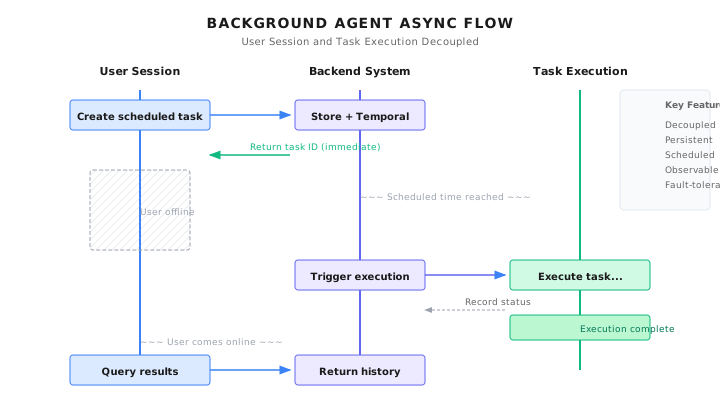
Core characteristics:
- Decoupling: User sessions and task execution completely separated
- Persistence: Task state stored in database/workflow engine
- Scheduling: Support Cron expression-based triggers
- Observability: Task status, progress, results queryable anytime
- Fault tolerance: Automatic retry on failure, checkpoint recovery
29.2 Architecture Design: Temporal + Schedule Manager
Shannon's Background Agents are built on the Temporal workflow engine. Temporal was chosen because it provides:
- Native scheduling capability (Schedule)
- Persistent workflow state
- Automatic retry and failure recovery
- Observability and audit logs
Core Components
+-----------------------------------------------------------+
|                    Orchestrator (Go)                       |
|                                                           |
|  +-----------------------------------------------------+  |
|  |              Schedule Manager                        |  |
|  |  - CreateSchedule()  Create scheduled task           |  |
|  |  - PauseSchedule()   Pause task                     |  |
|  |  - ResumeSchedule()  Resume task                    |  |
|  |  - DeleteSchedule()  Delete task                    |  |
|  |  - ListSchedules()   List tasks                     |  |
|  +-------------------------+---------------------------+  |
+-----------------------------|-----------------------------+
                              |
           +------------------+------------------+
           v                  v                  v
    +------------+     +------------+     +------------+
    | PostgreSQL |     |  Temporal  |     |   Worker   |
    | (Metadata) |     | (Scheduler)|     | (Executor) |
    +------------+     +------------+     +------------+
Schedule Manager: Manages the lifecycle of scheduled tasks, enforces business rules (quotas, budgets, minimum intervals).
PostgreSQL: Stores schedule metadata, execution history, user configuration.
Temporal: The actual scheduling engine, responsible for triggering workflows according to Cron expressions.
Worker: Executes the actual Agent tasks.
Why Two Storage Layers?
You might ask: Temporal already stores schedule information, why also PostgreSQL?
Because they're responsible for different things:
| Storage Layer | Responsible For | Query Needs |
|---|---|---|
| Temporal | Workflow state, schedule triggers | Used internally by Temporal |
| PostgreSQL | Business metadata, user config, execution history | User UI, analytics reports, auditing |
For example, "query all scheduled tasks for a user" -- querying PostgreSQL directly is much faster than traversing Temporal.
29.3 Creating Scheduled Tasks
Creating scheduled tasks requires multiple validations. Here's Shannon's implementation:
// Excerpt from go/orchestrator/internal/schedules/manager.go

// CreateSchedule creates a new scheduled task
func (m *Manager) CreateSchedule(ctx context.Context, req *CreateScheduleInput) (*Schedule, error) {
    // 1. Validate Cron expression
    schedule, err := m.cronParser.Parse(req.CronExpression)
    if err != nil {
        return nil, fmt.Errorf("%w: %v", ErrInvalidCronExpression, err)
    }

    // 2. Enforce minimum interval
    if !m.validateMinInterval(req.CronExpression) {
        return nil, fmt.Errorf("%w: must be at least %d minutes",
            ErrIntervalTooShort, m.config.MinCronIntervalMins)
    }

    // 3. Check user quota
    count, err := m.dbOps.CountSchedulesByUser(ctx, req.UserID, req.TenantID)
    if err != nil {
        return nil, fmt.Errorf("failed to check schedule limit: %w", err)
    }
    if count >= m.config.MaxPerUser {
        return nil, fmt.Errorf("%w: %d/%d schedules",
            ErrScheduleLimitReached, count, m.config.MaxPerUser)
    }

    // 4. Validate budget limit
    if req.MaxBudgetPerRunUSD < 0 {
        return nil, fmt.Errorf("budget cannot be negative: $%.2f", req.MaxBudgetPerRunUSD)
    }
    if req.MaxBudgetPerRunUSD > m.config.MaxBudgetPerRunUSD {
        return nil, fmt.Errorf("%w: $%.2f > $%.2f", ErrBudgetExceeded,
            req.MaxBudgetPerRunUSD, m.config.MaxBudgetPerRunUSD)
    }

    // 5. Validate timezone
    timezone := req.Timezone
    if timezone == "" {
        timezone = "UTC"
    }
    tz, err := time.LoadLocation(timezone)
    if err != nil {
        return nil, fmt.Errorf("%w: %s", ErrInvalidTimezone, timezone)
    }

    // 6. Generate ID
    scheduleID := uuid.New()
    temporalScheduleID := fmt.Sprintf("schedule-%s", scheduleID.String())

    // 7. Create schedule in Temporal
    _, err = m.temporalClient.ScheduleClient().Create(ctx, client.ScheduleOptions{
        ID: temporalScheduleID,
        Spec: client.ScheduleSpec{
            CronExpressions: []string{req.CronExpression},
            TimeZoneName:    timezone,
        },
        Action: &client.ScheduleWorkflowAction{
            Workflow:           "ScheduledTaskWorkflow",
            TaskQueue:          "shannon-tasks",
            WorkflowRunTimeout: time.Duration(req.TimeoutSeconds) * time.Second,
            Args: []interface{}{
                ScheduledTaskInput{
                    ScheduleID:         scheduleID.String(),
                    TaskQuery:          req.TaskQuery,
                    TaskContext:        req.TaskContext,
                    MaxBudgetPerRunUSD: req.MaxBudgetPerRunUSD,
                    UserID:             req.UserID.String(),
                    TenantID:           req.TenantID.String(),
                },
            },
        },
        Paused: false,
    })
    if err != nil {
        return nil, fmt.Errorf("failed to create Temporal schedule: %w", err)
    }

    // 8. Calculate next execution time
    nextRun := schedule.Next(time.Now().In(tz))

    // 9. Persist to database
    dbSchedule := &Schedule{
        ID:                 scheduleID,
        UserID:             req.UserID,
        TenantID:           req.TenantID,
        Name:               req.Name,
        CronExpression:     req.CronExpression,
        Timezone:           timezone,
        TaskQuery:          req.TaskQuery,
        MaxBudgetPerRunUSD: req.MaxBudgetPerRunUSD,
        TemporalScheduleID: temporalScheduleID,
        Status:             ScheduleStatusActive,
        NextRunAt:          &nextRun,
    }

    if err := m.dbOps.CreateSchedule(ctx, dbSchedule); err != nil {
        // Rollback: delete Temporal schedule
        _ = m.temporalClient.ScheduleClient().GetHandle(ctx, temporalScheduleID).Delete(ctx)
        return nil, fmt.Errorf("failed to persist schedule: %w", err)
    }

    return dbSchedule, nil
}
Design Points
-
Temporal first, database second: If database write fails, rollback the Temporal schedule. Reverse order is harder to rollback.
-
Multiple validations: Cron syntax, minimum interval, user quota, budget limit, timezone validity -- all validated at creation time.
-
Pre-calculate next execution time: Convenient for UI display, no need to query Temporal each time.
Minimum Interval Validation
Prevents users from creating overly frequent schedules (like every minute), which would exhaust resources and budgets:
// validateMinInterval checks if Cron expression meets minimum interval
func (m *Manager) validateMinInterval(cronExpression string) bool {
    if m.config.MinCronIntervalMins <= 0 {
        return true // No limit
    }

    schedule, err := m.cronParser.Parse(cronExpression)
    if err != nil {
        return false
    }

    // Calculate next two execution times
    now := time.Now().In(time.UTC)
    next1 := schedule.Next(now)
    next2 := schedule.Next(next1)

    // Check if interval meets minimum requirement
    intervalMinutes := next2.Sub(next1).Minutes()
    return intervalMinutes >= float64(m.config.MinCronIntervalMins)
}
29.4 Pause and Resume
Users may need to temporarily pause schedules (like during vacation when reports aren't needed), then resume later.
Pause
// PauseSchedule pauses a scheduled task
func (m *Manager) PauseSchedule(ctx context.Context, scheduleID uuid.UUID, reason string) error {
    // 1. Get schedule
    dbSchedule, err := m.dbOps.GetSchedule(ctx, scheduleID)
    if err != nil {
        return fmt.Errorf("schedule not found: %w", err)
    }

    if dbSchedule.Status == ScheduleStatusPaused {
        return nil // Already paused, idempotent
    }

    // 2. Pause in Temporal
    handle := m.temporalClient.ScheduleClient().GetHandle(ctx, dbSchedule.TemporalScheduleID)
    if err := handle.Pause(ctx, client.SchedulePauseOptions{
        Note: reason,
    }); err != nil {
        return fmt.Errorf("failed to pause Temporal schedule: %w", err)
    }

    // 3. Update database status
    if err := m.dbOps.UpdateScheduleStatus(ctx, scheduleID, ScheduleStatusPaused); err != nil {
        return fmt.Errorf("failed to update schedule status: %w", err)
    }

    m.logger.Info("Schedule paused",
        zap.String("schedule_id", scheduleID.String()),
        zap.String("reason", reason),
    )

    return nil
}
Resume
// ResumeSchedule resumes a paused scheduled task
func (m *Manager) ResumeSchedule(ctx context.Context, scheduleID uuid.UUID, reason string) (*time.Time, error) {
    // 1. Get schedule
    dbSchedule, err := m.dbOps.GetSchedule(ctx, scheduleID)
    if err != nil {
        return nil, fmt.Errorf("schedule not found: %w", err)
    }

    if dbSchedule.Status == ScheduleStatusActive {
        return dbSchedule.NextRunAt, nil // Already active, return next execution time
    }

    // 2. Resume in Temporal
    handle := m.temporalClient.ScheduleClient().GetHandle(ctx, dbSchedule.TemporalScheduleID)
    if err := handle.Unpause(ctx, client.ScheduleUnpauseOptions{
        Note: reason,
    }); err != nil {
        return nil, fmt.Errorf("failed to unpause Temporal schedule: %w", err)
    }

    // 3. Calculate new next execution time
    schedule, _ := m.cronParser.Parse(dbSchedule.CronExpression)
    tz, _ := time.LoadLocation(dbSchedule.Timezone)
    nextRun := schedule.Next(time.Now().In(tz))

    // 4. Update database
    m.dbOps.UpdateScheduleStatus(ctx, scheduleID, ScheduleStatusActive)
    m.dbOps.UpdateScheduleNextRun(ctx, scheduleID, nextRun)

    return &nextRun, nil
}
Idempotency
Note both methods are idempotent:
- Pausing an already paused schedule returns success directly
- Resuming an already active schedule returns the next execution time directly
This way callers don't need to query status before deciding whether to operate.
29.5 Cron Expression Deep Dive
Cron is the standard language for scheduled execution. Shannon uses the standard 5-field format:
+------------- Minute (0 - 59)
| +----------- Hour (0 - 23)
| | +--------- Day of Month (1 - 31)
| | | +------- Month (1 - 12)
| | | | +----- Day of Week (0 - 6, 0=Sunday)
| | | | |
* * * * *
Common Examples
| Expression | Meaning |
|---|---|
0 9 * * * | Every day at 9 AM |
0 9 * * 1-5 | Monday to Friday at 9 AM |
0 */4 * * * | Every 4 hours on the hour |
0 0 1 * * | First day of every month at midnight |
30 8 * * 1 | Every Monday at 8:30 AM |
0 9,18 * * * | Every day at 9 AM and 6 PM |
Timezone Support
Timezone is a key feature of Background Agents. When a user says "every day at 9 AM," they mean 9 AM in their timezone, not UTC.
// Temporal schedules support timezones
_, err = m.temporalClient.ScheduleClient().Create(ctx, client.ScheduleOptions{
    Spec: client.ScheduleSpec{
        CronExpressions: []string{"0 9 * * *"},
        TimeZoneName:    "Asia/Tokyo",  // 9 AM Tokyo time
    },
})
Supports standard IANA timezone names: America/New_York, Europe/London, Asia/Shanghai, etc.
29.6 Budget and Cost Control
Background Agents run when users aren't present, making cost control even more important.
Three-Layer Budget Control
- System-level limit: Max budget per execution (admin configured)
- User-level budget: User-set budget per execution
- Cumulative budget: Total consumption cap for a schedule (optional)
// System configuration
type Config struct {
    MaxPerUser          int     // Max schedules per user (default: 50)
    MinCronIntervalMins int     // Minimum execution interval (default: 60 minutes)
    MaxBudgetPerRunUSD  float64 // Max budget per execution (default: $10)
}

// Validation at creation
if req.MaxBudgetPerRunUSD > m.config.MaxBudgetPerRunUSD {
    return nil, fmt.Errorf("%w: $%.2f > $%.2f", ErrBudgetExceeded,
        req.MaxBudgetPerRunUSD, m.config.MaxBudgetPerRunUSD)
}
Budget Injection into Workflow
// Inject budget in ScheduledTaskWorkflow
if input.MaxBudgetPerRunUSD > 0 {
    if taskInput.Context == nil {
        taskInput.Context = make(map[string]interface{})
    }
    taskInput.Context["max_budget_usd"] = input.MaxBudgetPerRunUSD
}
The main workflow checks this budget and stops execution when exceeded.
Cost Tracking
Record cost after each execution for analysis and alerting:
// Record after execution completes
workflow.ExecuteActivity(activityCtx, "RecordScheduleExecutionComplete",
    RecordScheduleExecutionCompleteInput{
        ScheduleID: scheduleID,
        TaskID:     childWorkflowID,
        Status:     status,
        TotalCost:  totalCost,  // Extracted from child workflow
        ErrorMsg:   errorMsg,
    },
).Get(ctx, nil)
29.7 Orphan Detection and Cleanup
Database and Temporal states can become inconsistent. For example:
- Someone manually deleted a schedule in Temporal UI
- Data lost during database migration
- Network issues interrupted the creation flow
Regular detection and cleanup is needed:
// VerifyScheduleExists checks if schedule exists in Temporal
func (m *Manager) VerifyScheduleExists(ctx context.Context, schedule *Schedule) (bool, error) {
    if schedule.Status != ScheduleStatusActive && schedule.Status != ScheduleStatusPaused {
        return true, nil // Only verify active/paused schedules
    }

    handle := m.temporalClient.ScheduleClient().GetHandle(ctx, schedule.TemporalScheduleID)
    _, err := handle.Describe(ctx)
    if err != nil {
        if strings.Contains(err.Error(), "not found") {
            m.logger.Warn("Detected orphaned schedule - Temporal schedule not found",
                zap.String("schedule_id", schedule.ID.String()),
                zap.String("temporal_id", schedule.TemporalScheduleID),
            )
            // Mark as deleted in database
            m.dbOps.UpdateScheduleStatus(ctx, schedule.ID, ScheduleStatusDeleted)
            return false, nil
        }
        // Other errors uncertain, assume exists
        return true, nil
    }
    return true, nil
}

// DetectAndCleanOrphanedSchedules batch detects orphan schedules
func (m *Manager) DetectAndCleanOrphanedSchedules(ctx context.Context) ([]uuid.UUID, error) {
    schedules, err := m.dbOps.GetAllActiveSchedules(ctx)
    if err != nil {
        return nil, fmt.Errorf("failed to get active schedules: %w", err)
    }

    var orphanedIDs []uuid.UUID
    for _, schedule := range schedules {
        exists, err := m.VerifyScheduleExists(ctx, schedule)
        if err != nil {
            continue
        }
        if !exists {
            orphanedIDs = append(orphanedIDs, schedule.ID)
        }
    }

    if len(orphanedIDs) > 0 {
        m.logger.Info("Cleaned up orphaned schedules",
            zap.Int("count", len(orphanedIDs)),
        )
    }

    return orphanedIDs, nil
}
Recommend running orphan detection daily via another scheduled task.
29.8 Security Considerations
Background Agents run when users aren't present, making security risks higher.
Risk Matrix
| Risk | Description | Mitigation |
|---|---|---|
| Budget runaway | Background task consumes massive tokens | Per-execution budget limit |
| Infinite loop | Agent stuck in retry loop | Max retry count, execution timeout |
| Privilege abuse | Scheduled task executes sensitive operations | Operation audit, minimize privileges |
| Resource exhaustion | Too many schedules running simultaneously | User quota, minimum interval |
| State inconsistency | Database and Temporal out of sync | Orphan detection, state verification |
Operation Audit
Every execution should have complete audit records:
type ScheduleExecution struct {
    ID          uuid.UUID
    ScheduleID  uuid.UUID
    StartedAt   time.Time
    CompletedAt *time.Time
    Status      string    // RUNNING, COMPLETED, FAILED
    TotalCost   float64
    ErrorMsg    *string
    Metadata    map[string]interface{}
}
Sensitive Operation Restrictions
Background tasks shouldn't execute certain sensitive operations (at least not without additional authorization):
# Conceptual Example: Background Task Operation Restrictions

BACKGROUND_RESTRICTED_OPERATIONS = [
    "delete_data",        # Delete data
    "send_email",         # Send email (could be spam)
    "make_purchase",      # Purchase operations
    "modify_permissions", # Modify permissions
]

def check_background_operation(operation: str, is_background: bool) -> bool:
    if is_background and operation in BACKGROUND_RESTRICTED_OPERATIONS:
        raise BackgroundOperationRestricted(
            f"Operation '{operation}' is not allowed in background tasks. "
            f"Please trigger manually with user confirmation."
        )
    return True
29.9 Practical Examples
Example 1: Daily News Digest
# Conceptual Example: Create Daily News Digest

async def create_daily_news_schedule(
    topic: str,
    user_id: str,
    timezone: str = "UTC",
) -> dict:
    """Create daily news digest scheduled task"""

    request = {
        "name": f"Daily News: {topic}",
        "cron_expression": "0 9 * * *",  # Every day at 9 AM
        "timezone": timezone,
        "task_query": f"""
Generate a daily news digest about {topic}.

Include:
1. Top 5 news from the past 24 hours
2. Key insights and trends
3. Notable quotes or data points
4. Links to original sources

Format: Markdown, suitable for email newsletter.
""",
        "task_context": {
            "output_format": "markdown",
            "max_sources": 10,
        },
        "max_budget_per_run_usd": 2.0,
        "timeout_seconds": 600,
        "user_id": user_id,
    }

    return await schedule_client.create(request)
Example 2: Competitor Monitoring
# Conceptual Example: Competitor Website Monitoring

async def create_competitor_monitor(
    competitor_urls: List[str],
    user_id: str,
) -> dict:
    """Create competitor monitoring scheduled task"""

    request = {
        "name": "Competitor Price Monitor",
        "cron_expression": "0 */6 * * *",  # Every 6 hours
        "timezone": "UTC",
        "task_query": f"""
Monitor these competitor websites for changes:
{chr(10).join(competitor_urls)}

Report:
1. Any price changes detected
2. New products or features
3. Marketing message changes
4. Compare with previous check

If significant changes detected, flag as ALERT.
""",
        "task_context": {
            "previous_state_key": "competitor_state",  # Persisted state
            "alert_threshold": "significant",
        },
        "max_budget_per_run_usd": 3.0,
        "timeout_seconds": 900,
        "user_id": user_id,
    }

    return await schedule_client.create(request)
Example 3: Weekly Summary Report
# Conceptual Example: Weekly Summary

async def create_weekly_summary(
    topics: List[str],
    user_id: str,
) -> dict:
    """Create weekly summary report"""

    request = {
        "name": "Weekly AI Industry Summary",
        "cron_expression": "0 9 * * 1",  # Every Monday at 9 AM
        "timezone": "America/New_York",
        "task_query": f"""
Generate a comprehensive weekly summary for:
{', '.join(topics)}

Include:
1. Major announcements and releases
2. Funding and acquisitions
3. Research paper highlights
4. Industry trends analysis
5. Predictions for next week
""",
        "max_budget_per_run_usd": 5.0,
        "timeout_seconds": 1800,
        "user_id": user_id,
    }

    return await schedule_client.create(request)
29.10 Common Pitfalls
Pitfall 1: Timezone Confusion
User says "every day at 9 AM," but system executes in UTC.
// Wrong: Default UTC, user unaware
cron := "0 9 * * *"  // User thinks local 9 AM, actually UTC 9 AM

// Right: Explicitly require timezone, clearly state in response
if req.Timezone == "" {
    req.Timezone = "UTC"
}
response.Timezone = req.Timezone
response.NextRunAt = schedule.Next(time.Now().In(tz))
response.NextRunLocal = response.NextRunAt.Format("2006-01-02 15:04 MST")
Pitfall 2: Forgetting to Rollback
When creating a schedule, if database write fails, forgetting to delete the already-created Temporal schedule.
// Wrong: No rollback
_, err = m.temporalClient.ScheduleClient().Create(ctx, ...)
// ... Temporal creation succeeded

err = m.dbOps.CreateSchedule(ctx, dbSchedule)
if err != nil {
    return nil, err  // Temporal schedule becomes orphan!
}

// Right: Rollback on failure
if err := m.dbOps.CreateSchedule(ctx, dbSchedule); err != nil {
    _ = m.temporalClient.ScheduleClient().GetHandle(ctx, temporalScheduleID).Delete(ctx)
    return nil, fmt.Errorf("failed to persist schedule: %w", err)
}
Pitfall 3: Only Deleting from Database
// Wrong: Only delete database record
m.dbOps.DeleteSchedule(ctx, scheduleID)
// Temporal schedule keeps running, becomes orphan!

// Right: Delete Temporal first, then update database
handle := m.temporalClient.ScheduleClient().GetHandle(ctx, dbSchedule.TemporalScheduleID)
handle.Delete(ctx)
m.dbOps.UpdateScheduleStatus(ctx, scheduleID, ScheduleStatusDeleted)
Pitfall 4: No Budget Limit
// Wrong: User can set any budget
request.MaxBudgetPerRunUSD = 1000.0  // $1000 per execution

// Right: Enforce system cap
if req.MaxBudgetPerRunUSD > m.config.MaxBudgetPerRunUSD {
    return nil, fmt.Errorf("%w: $%.2f > $%.2f", ErrBudgetExceeded,
        req.MaxBudgetPerRunUSD, m.config.MaxBudgetPerRunUSD)
}
29.11 Recap
- Background Agent Definition: Tasks run independently from user sessions, support scheduled execution, pause/resume
- Dual-layer storage: Temporal handles scheduling execution, PostgreSQL handles business queries
- Multiple validations: Cron syntax, minimum interval, user quota, budget limit
- Timezone support: Users expect local time, must handle timezones explicitly
- Orphan cleanup: Regularly detect inconsistent state between database and Temporal
Shannon Lab (10-Minute Quickstart)
This section helps you map this chapter's concepts to Shannon source code in 10 minutes.
Required Reading (1 file)
go/orchestrator/internal/schedules/manager.go: Complete Schedule Manager implementation, including create, pause, resume, delete
Optional Deep Dives (2, pick by interest)
go/orchestrator/internal/workflows/scheduled/scheduled_task_workflow.go: Workflow wrapper executed when schedule triggers- Budget configuration in
config/models.yaml: Understand how to set system-level resource limits
Exercises
Exercise 1: Design Alert Scheduling
Design a monitoring alert system:
- Check system status every 5 minutes
- If anomaly detected, send alert notification
- After alerting, enter "cooldown period" to avoid repeated alerts
- When anomaly recovers, send recovery notification
Exercise 2: Implement Execution History Query
Design execution history API and storage:
- Store start time, end time, status, cost for each execution
- Support query by schedule ID
- Support filter by time range
- Calculate cumulative cost for a schedule
Exercise 3 (Advanced): Cascade Pause
Design a system that, when a schedule fails 3 consecutive times:
- Auto-pause the schedule
- Send notification to user
- Record pause reason
- Check if failure cause is resolved when user resumes
Further Reading
- Temporal Schedules - https://docs.temporal.io/workflows#schedule
- Cron Expression - https://crontab.guru/
- IANA Time Zone Database - https://www.iana.org/time-zones
Next Chapter Preview
Background Agents execute tasks on schedule, but which model to use each time? Always the most expensive large model? That's too costly.
The next chapter covers Tiered Model Strategy -- how to achieve 50-70% cost reduction through intelligent model selection.
The core idea is simple: simple tasks use small models, complex tasks use large models. But implementation isn't that simple:
- How do you judge task complexity?
- Should small model failures upgrade to large models?
- What models suit different types of tasks?
In the next chapter, we'll look at Shannon's tiered model routing strategy.