第 5 章:Skills 技能系统
把 System Prompt、工具白名单、参数约束打包成可复用的配置——这个概念在不同系统有不同实现,但核心思想一致。
术语说明
| 本章术语 | 对应系统 | 说明 |
|---|---|---|
| Presets | Shannon | 角色预设,定义在 roles/presets.py |
| Agent Skills | Anthropic 开放标准 | 跨平台技能规范,.claude/skills/ 等 |
本章先讲通用概念,再分别介绍 Shannon Presets 和 Agent Skills 两种实现。
Part A:通用概念
5.1 什么是技能系统?
前几章我们讲了单个 Agent 的工具和推理能力。但有个问题开始显现:同一个 Agent,换个任务就不行了。
我之前给一个客户做代码审查 Agent。配置很简单:System Prompt 强调"找出潜在 bug 和安全问题",工具只有文件读取和代码搜索。效果不错,发现了不少隐藏的问题。
一个月后,客户提了新需求:"能不能用这个 Agent 做市场研究?"
我试了试——完全不行。代码审查的 Prompt 在说"找 bug、看类型安全",但市场研究需要的是"搜索趋势、对比数据、引用来源"。工具也对不上:文件读取没用,需要的是网页搜索和数据抓取。
最后我花了一下午,重新配了一套"研究员"角色。两套配置,完全不同。
这就是技能系统要解决的问题——预设好的角色配置可以一键切换。 代码审查用 code_reviewer,市场研究用 researcher。
一句话定义
技能系统 = System Prompt + 工具白名单 + 参数约束的打包
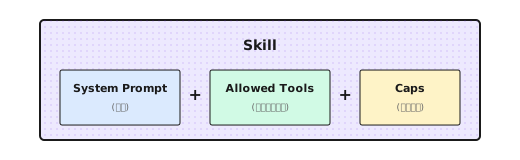
为什么需要?
- 避免每次重新配置——换个任务不用从头写 Prompt
- 减少遗漏和错误——用名字引用,不会忘记某个参数
- 团队共享最佳实践——好的配置可以复用
两种实现思路
| 思路 | 代表 | 特点 |
|---|---|---|
| 框架内置 | Shannon Presets | 代码级配置,Python 字典 |
| 跨平台标准 | Agent Skills | 文件级配置,Markdown + YAML |
接下来我们分别看这两种实现。
Part B:Shannon Presets
5.2 Shannon 的 Presets 注册表
Shannon 把技能系统实现为 Presets(预设),存在 roles/presets.py 里:
_PRESETS: Dict[str, Dict[str, object]] = {
    "analysis": {
        "system_prompt": "You are an analytical assistant. Provide concise reasoning...",
        "allowed_tools": ["web_search", "file_read"],
        "caps": {"max_tokens": 30000, "temperature": 0.2},
    },
    "research": {
        "system_prompt": "You are a research assistant. Gather facts from authoritative sources...",
        "allowed_tools": ["web_search", "web_fetch", "web_crawl"],
        "caps": {"max_tokens": 16000, "temperature": 0.3},
    },
    "writer": {
        "system_prompt": "You are a technical writer. Produce clear, organized prose.",
        "allowed_tools": ["file_read"],
        "caps": {"max_tokens": 8192, "temperature": 0.6},
    },
    "generalist": {
        "system_prompt": "You are a helpful AI assistant.",
        "allowed_tools": [],
        "caps": {"max_tokens": 8192, "temperature": 0.7},
    },
}
三个字段各有用途:
| 字段 | 干什么 | 设计考量 |
|---|---|---|
system_prompt | 定义"人设"和行为准则 | 越具体越好 |
allowed_tools | 工具白名单 | 最小权限原则 |
caps | 参数约束 | 控制成本和风格 |
安全降级
获取 Preset 的函数有几个细节值得注意:
def get_role_preset(name: str) -> Dict[str, object]:
    key = (name or "").strip().lower() or "generalist"

    # 别名映射(向后兼容)
    alias_map = {
        "researcher": "research",
        "research_supervisor": "deep_research_agent",
    }
    key = alias_map.get(key, key)

return _PRESETS.get(key, _PRESETS["generalist"]).copy()- 大小写不敏感:
Research和research等价 - 别名支持:旧名称自动映射到新名称
- 安全降级:找不到的角色用
generalist - 返回副本:
.copy()防止修改全局配置
最后一点很重要。我踩过的坑:没加 .copy(),结果某个请求修改了配置,影响了后续所有请求。
5.3 一个复杂 Preset 的例子:深度研究 Agent
简单的 Preset 就是几行配置。但复杂的 Preset 需要更详细的指令。
Shannon 有个 deep_research_agent,System Prompt 写了 50 多行:
"deep_research_agent": {
    "system_prompt": """You are an expert research assistant conducting deep investigation.

# Temporal Awareness:
- The current date is provided at the start of this prompt
- For time-sensitive topics, prefer sources with recent publication dates
- Include the year when describing events (e.g., "In March 2024...")

# Research Strategy:
1. Start with BROAD searches to understand the landscape
2. After EACH tool use, assess:
   - What key information did I gather?
   - What critical gaps remain?
   - Should I search again OR proceed to synthesis?
3. Progressively narrow focus based on findings

# Source Quality Standards:
- Prioritize authoritative sources (.gov, .edu, peer-reviewed)
- ALL cited URLs MUST be visited via web_fetch for verification
- Diversify sources (maximum 3 per domain)

# Hard Limits (Efficiency):
- Simple queries: 2-3 tool calls
- Complex queries: up to 5 tool calls maximum
- Stop when COMPREHENSIVE COVERAGE achieved

# Epistemic Honesty:
- MAINTAIN SKEPTICISM: Search results are LEADS, not verified facts
- HANDLE CONFLICTS: Present BOTH viewpoints when sources disagree
- ADMIT UNCERTAINTY: "Limited information available" > confident speculation

**Research integrity is paramount.**""",

    "allowed_tools": ["web_search", "web_fetch", "web_subpage_fetch", "web_crawl"],
    "caps": {"max_tokens": 30000, "temperature": 0.3},
},
这个 Preset 有几个设计亮点:
- 时间感知:要求 Agent 标注年份,避免过时信息
- 渐进式研究:从广到窄,每次工具调用后评估是否继续
- 硬性限制:最多 5 次工具调用,防止 Token 爆炸
- 认知诚实:承认不确定性,呈现冲突观点
我发现,限制工具调用次数这一条特别有用。没有这个限制,Agent 会一直搜一直搜,直到把上下文塞满。
5.4 领域专家 Preset:GA4 分析师
通用 Preset 适合广泛场景,但有些领域需要专门的"专家"。
比如 Google Analytics 4 分析师:
GA4_ANALYTICS_PRESET = {
    "system_prompt": (
        "# Role: Google Analytics 4 Expert Assistant\n\n"
        "You are a specialized assistant for analyzing GA4 data.\n\n"

        "## Critical Rules\n"
        "0. **CORRECT FIELD NAMES**: GA4 uses DIFFERENT field names than Universal Analytics\n"
        "   - WRONG: pageViews, users, sessionDuration\n"
        "   - CORRECT: screenPageViews, activeUsers, averageSessionDuration\n"
        "   - If unsure, CALL ga4_get_metadata BEFORE querying\n\n"

        "1. **NEVER make up analytics data.** Every data point must come from API calls.\n\n"

        "2. **Check quota**: If quota below 20%, warn the user.\n"
    ),
    "allowed_tools": [
        "ga4_run_report",
        "ga4_run_realtime_report",
        "ga4_get_metadata",
    ],
    "provider_override": "openai",  # 可以指定特定 provider
    "preferred_model": "gpt-4o",
    "caps": {"max_tokens": 16000, "temperature": 0.2},
}
领域 Preset 有几个特殊配置:
provider_override:强制用特定 Provider(比如某些任务用 GPT 效果更好)preferred_model:指定首选模型
这些是通用 Preset 没有的。
动态工具工厂
领域 Preset 还有一个常见需求:根据配置动态创建工具。
比如 GA4 工具需要绑定到特定的账户:
def create_ga4_tool_functions(property_id: str, credentials_path: str):
    """根据账户配置创建 GA4 工具"""
    client = GA4Client(property_id, credentials_path)

    def ga4_run_report(**kwargs):
        return client.run_report(**kwargs)

    def ga4_get_metadata():
        return client.get_available_dimensions_and_metrics()

    return {
        "ga4_run_report": ga4_run_report,
        "ga4_get_metadata": ga4_get_metadata,
    }
这样不同用户可以用不同的 GA4 账户,同一个 Preset 但绑定不同的凭证。
5.5 Prompt 模板渲染
有时候同一个 Preset 需要根据场景注入不同的变量。
比如数据分析 Preset:
"data_analytics": {
    "system_prompt": (
        "# Setup\n"
        "profile_id: ${profile_id}\n"
        "User's account ID: ${aid}\n"
        "Date of today: ${current_date}\n\n"
        "You are a data analytics assistant..."
    ),
    "allowed_tools": ["processSchemaQuery"],
}
调用时传入参数:
context = {
    "role": "data_analytics",
    "prompt_params": {
        "profile_id": "49598h6e",
        "aid": "7b71d2aa-dc0d-4179-96c0-27330587fb50",
        "current_date": "2026-01-03",
    }
}
渲染函数会把 ${variable} 替换成实际值:
def render_system_prompt(prompt: str, context: Dict) -> str:
    variables = context.get("prompt_params", {})

    def substitute(match):
        var_name = match.group(1)
        return str(variables.get(var_name, ""))

    return re.sub(r"\$\{(\w+)\}", substitute, prompt)
渲染后:
# Setup
profile_id: 49598h6e
User's account ID: 7b71d2aa-dc0d-4179-96c0-27330587fb50
Date of today: 2026-01-03

You are a data analytics assistant...
5.6 运行时动态增强
Preset 定义的是静态配置,但运行时还会动态注入一些内容:
# 注入当前日期
current_date = datetime.now().strftime("%Y-%m-%d")
system_prompt = f"Current date: {current_date} (UTC).\n\n" + system_prompt

# 注入语言指令
if context.get("target_language") and context["target_language"] != "English":
    lang = context["target_language"]
    system_prompt = f"CRITICAL: Respond in {lang}.\n\n" + system_prompt

# 研究模式增强
if context.get("research_mode"):
    system_prompt += "\n\nRESEARCH MODE: Do not rely on snippets. Use web_fetch to read full content."
这样 Preset 的静态配置和运行时上下文结合起来,才是最终送给 LLM 的 System Prompt。
5.7 Vendor Adapter 模式
对于需要与外部系统深度集成的 Preset,Shannon 用了一个巧妙的设计:
roles/
├── presets.py              # 通用预设
├── ga4/
│   └── analytics_agent.py  # GA4 专用
├── ptengine/
│   └── data_analytics.py   # Ptengine 专用
└── vendor/
    └── custom_client.py    # 客户定制(不提交)
加载逻辑:
# 可选加载 vendor roles
try:
    from .ga4.analytics_agent import GA4_ANALYTICS_PRESET
    _PRESETS["ga4_analytics"] = GA4_ANALYTICS_PRESET
except Exception:
    pass  # 模块不存在时静默失败

try:
    from .ptengine.data_analytics import DATA_ANALYTICS_PRESET
    _PRESETS["data_analytics"] = DATA_ANALYTICS_PRESET
except Exception:
    pass
好处是:
- 核心代码干净:通用 presets 不依赖任何 vendor 模块
- 优雅降级:模块不存在不会报错
- 客户定制:私有 vendor 目录可以存放不提交的代码
5.8 设计一个新 Preset
假设你要做一个"代码审查师"Preset,怎么设计?
"code_reviewer": {
    "system_prompt": """You are a senior code reviewer with 10+ years of experience.

## Mission
Review code for bugs, security issues, and maintainability problems.
Focus on HIGH-IMPACT issues that matter for production.

## Severity Levels
1. CRITICAL: Security vulnerabilities, data corruption risks
2. HIGH: Logic errors, race conditions, resource leaks
3. MEDIUM: Code smells, performance issues
4. LOW: Style, naming, documentation

## Output Format
For each issue:
- **Severity**: CRITICAL/HIGH/MEDIUM/LOW
- **Location**: file:line
- **Issue**: Brief description
- **Suggestion**: How to fix
- **Confidence**: HIGH/MEDIUM/LOW

## Rules
- Only report issues with MEDIUM+ confidence
- Limit to 10 most important issues per review
- Skip style issues unless explicitly asked

## Anti-patterns to Watch
- SQL injection, XSS, command injection
- Hardcoded secrets in code
- Unchecked null access
- Resource leaks
""",
    "allowed_tools": ["file_read", "grep_search"],
    "caps": {"max_tokens": 8000, "temperature": 0.1},
}
设计决策:
| 决策 | 理由 |
|---|---|
| 低 temperature (0.1) | 代码审查要准确,不要创意 |
| 限制 10 个问题 | 避免信息过载 |
| 置信度标注 | 让用户知道哪些要优先验证 |
| 最小工具集 | 只需要读文件和搜索,不需要写 |
5.9 常见的坑
坑 1:System Prompt 太模糊
# 太模糊 - 不够具体
"system_prompt": "You are a helpful assistant."

# 具体明确
"system_prompt": """You are a research assistant.

RULES:
- Cite sources for all factual claims
- Use bullet points for readability
- Maximum 3 paragraphs unless asked for more

OUTPUT FORMAT:
## Summary
[1-2 sentences]

## Key Findings
- Finding 1 (Source: ...)
"""
坑 2:工具权限太宽
# 权限过宽 - 给太多工具
"allowed_tools": ["web_search", "file_write", "shell_execute", "database_query"]

# 最小权限 - 只给必要的
"allowed_tools": ["web_search", "web_fetch"]  # 研究任务只需搜索
给太多工具,LLM 会困惑(不知道用哪个),也增加安全风险。
坑 3:不设参数约束
# 没有限制 - 容易失控
"caps": {}

# 根据任务设约束
"caps": {"max_tokens": 1000, "temperature": 0.3}  # 简短回复
"caps": {"max_tokens": 16000, "temperature": 0.6}  # 长文生成
不设 max_tokens,Token 消耗会失控。
坑 4:缺少降级策略
# 模块不存在会崩
from .custom_module import CUSTOM_PRESET
_PRESETS["custom"] = CUSTOM_PRESET

# 优雅降级
try:
    from .custom_module import CUSTOM_PRESET
    _PRESETS["custom"] = CUSTOM_PRESET
except Exception:
    pass  # 用默认的 generalist
Part C:Agent Skills
5.10 Agent Skills:解决上下文膨胀问题
前面我们看了 Shannon 的 Presets。现在来看另一种技能系统:Agent Skills。
问题:上下文窗口是稀缺资源
2025 年,AI 编程工具爆发。Claude Code、Cursor、GitHub Copilot、Codex CLI……开发者很快发现一个问题:上下文窗口不够用。
以 MCP(Model Context Protocol)为例。MCP 让 Agent 能连接外部服务——GitHub、Jira、数据库。听起来很美,但有个代价:
| MCP 服务器 | 工具数量 | Token 消耗 |
|---|---|---|
| GitHub 官方 | 93 个工具 | ~55,000 tokens |
| Task Master | 59 个工具 | ~45,000 tokens |
一个 Claude Code 用户报告:启用几个 MCP 后,上下文使用量达到 178k/200k(89%),其中 MCP 工具定义就占了 63.7k。还没开始干活,上下文已经快满了。
问题的根源是:MCP 在启动时加载所有工具定义。不管你用不用,93 个 GitHub 工具的 schema 都要塞进上下文。
Skills 的解法:渐进式披露
2025 年 10 月,Anthropic 在 Claude Code 中引入 Skills。核心设计思路是:按需加载,而不是全量加载。
官方把这叫做"渐进式披露"(Progressive Disclosure),比喻成一本组织良好的手册:
"先是目录,然后是具体章节,最后是详细的附录。"
技术上,分三层:
- 元数据层:启动时只加载
name和description,每个 Skill 约 30-50 tokens - 内容层:用户请求匹配时,才加载完整
SKILL.md,通常 < 5k tokens - 扩展层:引用的
reference.md、examples/、scripts/只在实际需要时加载
效果是什么?你可以装几百个 Skills,但启动时只消耗几千 tokens。官方文档的说法:"the amount of context that can be bundled into a skill is effectively unbounded"(技能可以打包的上下文量实际上是无限的)。
与 MCP 的关系
Skills 不是要取代 MCP,而是互补:
- MCP 是"管道"——连接外部服务的 API
- Skills 是"手册"——教 Agent 如何用这些 API 完成任务
举个例子:你用 MCP 连了 Jira,但 Agent 不知道"创建 sprint"要调哪些端点、传什么参数。这时候需要一个"Jira 项目管理"Skill,告诉它完整工作流。
而且 Skills 本身的 Token 效率,也缓解了 MCP 带来的上下文压力——MCP 连接占用大量 tokens,但 Skill 指令只在需要时才加载。
时间线
| 时间 | 事件 |
|---|---|
| 2025 年 2 月 | Claude Code 发布 |
| 2025 年 10 月 | Claude Code 引入 Skills 功能;Simon Willison 文章引发关注 |
| 2025 年 12 月 | OpenAI Codex CLI 添加 Skills 支持;Anthropic 发布开放标准 |
| 2026 年 1 月 | Google Antigravity、Cursor 等跟进 |
5.11 Agent Skills 格式规范
目录结构
一个 Skill 是一个目录,SKILL.md 是入口:
my-skill/
├── SKILL.md           # 主指令(必需)
├── template.md        # 模板文件(可选)
├── reference.md       # 详细参考文档(可选)
├── examples/
│   └── sample.md      # 示例输出(可选)
└── scripts/
└── helper.py # 可执行脚本(可选)SKILL.md 是必需的,其他文件按需添加。
SKILL.md 格式
---
name: my-skill
description: 这个技能做什么,什么时候用
allowed-tools: Read, Grep, Glob
---

## 你的指令

当执行这个任务时:
1. 第一步...
2. 第二步...
Frontmatter 字段
| 字段 | 必需 | 说明 |
|---|---|---|
name | 否 | 技能名称,默认用目录名。小写字母、数字、连字符 |
description | 推荐 | Claude 用此判断何时自动加载 |
allowed-tools | 否 | 工具白名单,限制技能可用的工具 |
disable-model-invocation | 否 | 设为 true 禁止 Claude 自动调用 |
user-invocable | 否 | 设为 false 从 / 菜单隐藏 |
context | 否 | 设为 fork 在子代理中运行 |
agent | 否 | 指定子代理类型(Explore、Plan 等) |
调用控制
两个字段控制谁能调用技能:
disable-model-invocation: true:只有用户能调用(适合有副作用的操作,如部署)user-invocable: false:只有 Claude 能调用(适合背景知识,用户不需要直接触发)
高级特性
变量替换:
---
name: fix-issue
description: 修复 GitHub issue
---

修复 GitHub issue $ARGUMENTS:
1. 读取 issue 描述
2. 实现修复
3. 创建 commit
运行 /fix-issue 123 时,$ARGUMENTS 被替换为 123。
动态上下文注入:
---
name: pr-summary
description: 总结 PR 变更
---

## PR 上下文
- PR diff: !`gh pr diff`
- PR 评论: !`gh pr view --comments`

## 任务
总结这个 PR 的变更...!`command` 语法会先执行命令,把输出注入到 Skill 内容里。
脚本执行:
Skills 可以包含 Python 或 Bash 脚本,Claude 可以执行它们:
my-skill/
├── SKILL.md
└── scripts/
    └── analyze.py    # Claude 可以运行这个脚本
5.12 一个简单示例
创建一个"代码审查"技能。在 Skills 目录下新建 code-review/SKILL.md:
---
name: code-review
description: 审查代码,找出 bug、安全问题、可维护性问题。当用户说"review"、"审查"、"看看这段代码"时使用。
allowed-tools: Read, Grep, Glob
---

## 审查标准

1. **安全问题**(优先级最高)
   - SQL 注入、XSS、命令注入
   - 硬编码的密钥

2. **逻辑错误**
   - 空指针、越界、资源泄漏

3. **可维护性**
   - 代码重复、过长函数、命名不清

## 输出格式

每个问题:
- **严重程度**:CRITICAL / HIGH / MEDIUM / LOW
- **位置**:file:line
- **问题**:简述
- **建议**:如何修复

## 规则

- 只报告 MEDIUM 及以上置信度的问题
- 最多报告 10 个最重要的问题
- 除非明确要求,跳过纯风格问题测试方式:
- 自动触发:说"帮我审查这段代码",Agent 会自动匹配并加载
- 手动触发:输入
/code-review src/auth/
5.13 官方资源与生态
官方资源
| 资源 | 链接 | 说明 |
|---|---|---|
| Agent Skills 规范 | agentskills.io | 官方标准定义和 SDK |
| Anthropic Skills 仓库 | github.com/anthropics/skills | 官方示例集合 |
| Claude Code 文档 | code.claude.com/docs/en/skills | 使用指南 |
| Skills Directory | claude.com/connectors | 合作伙伴 Skills 目录 |
Skills Directory
2025 年 12 月,Anthropic 同时推出了 Skills Directory——一个技能分发平台,让用户可以浏览和启用合作伙伴构建的 Skills。
首批合作伙伴包括:
| 合作伙伴 | 提供的 Skills |
|---|---|
| Atlassian | Jira 和 Confluence 集成——把需求文档转成待办事项、生成状态报告、检索公司知识库 |
| Figma | 设计稿理解——Claude 可以读懂 Figma 设计的上下文、细节和意图,准确转换成代码 |
| Notion | 文档和数据库操作 |
| Canva | 设计资源生成 |
| Stripe | 支付集成工作流 |
| Zapier | 自动化连接 |
| Vercel | 部署工作流 |
| Cloudflare | 边缘计算配置 |
这些 Skills 可以和对应的 MCP 连接器配合使用——MCP 提供 API 连接,Skill 提供工作流知识。
5.14 Agent Skills 在 Multi-Agent 编排中的设计
同样shannon也支持Agent Skills,前面讲的 Agent Skills 标准主要面向单 Agent 场景——一个 Agent 加载一个 Skill,按步骤执行。但在 Multi-Agent 系统里,问题变了:Orchestrator 怎么知道一个任务应该交给单 Agent 按 Skill 执行,还是拆分给多个 Agent 协作?
Shannon 的设计答案很简单:让 Skill 自己声明。
Skill 决定编排路径
Shannon 在 Anthropic 标准的基础上加了一个关键字段:requires_role。这个字段不只是指定角色,它直接影响 Orchestrator 的路由决策:
-
Skill 声明了
requires_role→ Orchestrator 跳过 LLM 任务分解,创建单 Agent 执行计划。因为 Skill 本身已经定义了完整的工作流步骤,再拆分反而会冲突。 -
Skill 没声明 role → Orchestrator 正常调用 LLM 做任务分解,拆成多个子任务走 DAG 并行执行。
换句话说,requires_role 是 Skills 和 Multi-Agent 编排的分叉点。Skill 的作者在设计时就决定了这个任务的执行模式。
为什么这么设计?因为不同任务的协作模式根本不同。
代码审查、调试、TDD——这些任务天然需要一个专家从头做到尾,拆给多个 Agent 反而会丢失上下文。而"调研 X 领域的最新进展"这类任务,天然需要多 Agent 并行搜索、汇总。
Skill 的作者最了解任务特性,所以让 Skill 自己决定执行模式。
这也带出了 Presets 和 Skills 的关系——Presets 管能力,Skills 管工作流。Skill 通过 requires_role 引用 Preset。比如 code-review Skill 指定 requires_role: critic,执行时 Agent 就只有只读权限(critic Preset 只允许 file_read)。而 Skill 的 Markdown 正文定义了具体的三阶段工作流:收集上下文 → 分析(安全/质量/性能)→ 输出报告。
这种分离的好处是可以自由组合:同一个 critic Preset 可以搭配 code-review、architecture-review、dependency-audit 不同的 Skill。能力边界不变,工作流随任务切换。
安全设计:三层叠加
在 Multi-Agent 系统里,安全边界比单 Agent 更重要——一个失控的 Agent 可能影响整个编排链。Shannon 在 Skill 层面叠加了三层防护:
- 谁能用:
dangerous: true的 Skill 需要 admin/owner 权限或专门的skills:dangerous授权 scope - 能用什么工具:
requires_role指向的 Preset 限制了工具白名单 - 花多少 Token:
budget_max限制单次执行的 Token 消耗上限
三层独立控制,互不依赖。一个 Skill 可以是非 dangerous 但有严格的工具限制(critic),也可以是 dangerous 但工具权限很宽(比如生产环境部署)。
Skills 在 Agent 间协商中的角色
Multi-Agent 协作时,Agent 之间需要传递任务。Shannon 的 P2P 消息协议里有一个 Skills 字段——发起方可以声明"完成这个任务需要 code-review 技能",接收方据此判断自己是否有能力接手。
这意味着 Skills 不只是指导单个 Agent 怎么做,还帮助系统决定谁来做。在 Part 5(多 Agent 编排)的 Handoff 机制中会进一步展开这个话题。
跳出本章:Tools、MCP、Skills 的统一视角
讲完 Skills,我们可以退一步看看整个 Part 2 的几个概念是怎么关联的。
本质:Tools、MCP、Skills 都是往 Agent 的上下文里注入信息,来补充 Agent 的能力。
| 机制 | 注入什么 | 补充什么能力 |
|---|---|---|
| Tools | 函数定义 + 执行逻辑 | 与外部系统交互 |
| MCP | 工具定义(来自外部服务) | 连接外部服务 |
| Skills | 指令 + 工作流知识 | 领域专业知识 |
三者的关系:
Tools ← 基础能力单元
  ↑
MCP ← 外部服务暴露 Tools 的标准方式
  ↑
Skills ← 教 Agent 如何组合使用 Tools 完成任务设计上的共同约束:上下文窗口是稀缺资源。
所以无论怎么变化,设计上都要:
- 按需加载——不用的别塞进去
- 最小化 Token 消耗——元数据先行,内容延迟
- 可组合——小模块拼成大能力
- 最小权限——只给完成任务必需的工具
这四条原则贯穿 Part 2 的所有章节。
理解本质,才能用好生态
Skills 生态确实在快速发展。跨平台标准、几十个支持的工具、合作伙伴目录、甚至 skill-creator skill 帮你写 skill——门槛越来越低。
但生态繁荣不等于拿来就能用。
回到本质:Skills 就是结构化的上下文注入。它降低了"教会 Agent 做事"的成本,但教什么、怎么教,还是要你自己想清楚。
市场上的通用 Skills 可以作为起点,但真正产生价值的往往是:
- 你公司的内部流程和最佳实践
- 客户的特定场景和需求
- 团队积累的领域 know-how
Skills Directory 上的 Atlassian、Figma、Stripe 之所以有价值,不是因为 SKILL.md 格式,而是因为他们把多年的产品经验和领域知识编码进去了。
建议:用生态里的 Skills 学习格式和思路,但核心的、差异化的 Skills 要自己沉淀。
本章要点回顾
-
技能系统 = System Prompt + 工具白名单 + 参数约束——把角色配置打包成可复用的单元
-
Shannon 用 Presets 实现——Python 字典,存在
roles/presets.py,和框架深度集成 -
Agent Skills 用渐进式披露解决上下文膨胀——启动只加载元数据(30-50 tokens/skill),内容按需加载
-
Agent Skills 格式简洁——目录 + SKILL.md + 可选支持文件
-
Skills 和 MCP 互补——MCP 提供 API 连接,Skills 提供工作流指令
Shannon Lab(10 分钟上手)
本节帮你在 10 分钟内把本章概念对应到 Shannon 源码。
必读(1 个文件)
roles/presets.py:看_PRESETS字典,理解角色预设的结构。重点看deep_research_agent这个复杂例子
选读深挖(按兴趣挑)
config/skills/core/code-review.md:看一个完整的内置 Skill,注意requires_role: critic和budget_max: 5000的搭配go/orchestrator/internal/skills/:Skills 注册表的 Go 实现,重点看models.go(Skill 结构体)和registry.go(加载逻辑)roles/ga4/analytics_agent.py:看一个真实的厂商定制角色- 对比
research和analysis两个预设,思考为什么工具列表不同
练习
练习 1:分析现有 Preset
读 Shannon 的 presets.py,回答:
research和analysis两个角色有什么区别?- 为什么
writer角色的 temperature 比analysis高? generalist角色的allowed_tools为什么是空列表?
练习 2:设计一个 Preset
为"代码审查"任务设计一个 Preset:
- 写 System Prompt(至少包含:职责、审查标准、输出格式)
- 列出需要的工具(file_read? git_diff? 其他?)
- 设置 temperature 和 max_tokens(并解释为什么)
练习 3:创建一个 Agent Skill
在 ~/.claude/skills/ 创建一个自定义 Skill:
- 选一个你常做的任务(写文档、生成测试、重构代码...)
- 写
SKILL.md,包含 frontmatter 和指令 - 在 Claude Code 中测试
练习 4(进阶):对比两种实现
思考:Shannon Presets 和 Agent Skills 各适合什么场景?
- 什么时候用代码级配置(Presets)更好?
- 什么时候用文件级配置(Skills)更好?
延伸阅读
- Agent Skills 官方规范 - 跨平台标准定义
- Anthropic 工程博客:Equipping agents for the real world - Agent Skills 设计理念
- Simon Willison: Claude Skills are awesome - Skills 为什么重要
- Claude Code Skills 文档 - 使用指南
- Shannon Roles Source Code - Presets 代码实现
下一章预告
技能系统解决了"Agent 应该怎么行为"的问题。但还有一个问题:
当 Agent 执行任务时,我们怎么知道它在做什么?怎么在关键节点插入自定义逻辑?
比如:
- 每次工具调用前记录日志
- 当 Token 消耗超过阈值时发出警告
- 在某些操作前请求用户确认
这就是下一章的内容——Hooks 与事件系统。
下一章我们继续。