第 24 章:策略治理(OPA)
OPA 让 Agent 系统的权限控制从硬编码走向声明式——策略更新无需重新部署代码,但它不是万能的;真正的安全来自分层防御。
⏱️ 快速通道(5 分钟掌握核心)
- OPA 把安全规则从代码里抽出来,改策略不用重新部署
- 默认拒绝 + deny 优先:未匹配的请求被拒绝,deny 规则最高优先级
- 灰度发布:先 dry-run 观察,再按百分比逐步 enforce
- 缓存决策结果,注意缓存键要包含所有影响决策的字段
- FailOpen 比 FailClosed 更适合生产环境(配合告警)
10 分钟路径:24.1-24.3 → 24.6 → Shannon Lab
你的 Agent 系统需要加一条规则:"禁止查询包含 password 的请求"。
怎么做?改代码,加个 if strings.Contains(req.Query, "password"),然后部署。
一周后,安全团队又要加十条规则。再改代码,再部署。
一个月后,代码里到处都是 if-else,没人能说清"为什么这个请求被拒绝了"。每次改规则都要走完整的 CI/CD 流程,紧急安全修复要等 2 小时才能生效。
我见过最夸张的情况:一个系统里有 200 多个安全检查点,分散在 30 多个文件里。新来的工程师想加一条规则,花了三天才找到所有需要改的地方。
这就是硬编码策略的困境。
24.1 为什么需要策略引擎?
硬编码的困境
对比硬编码与 OPA 声明式策略:
// ========== 传统做法:硬编码安全检查 ==========
func SubmitTask(ctx context.Context, req *TaskRequest) error {
    if strings.Contains(req.Query, "password") { return errors.New("forbidden") }
    if req.TokenBudget > 10000 { return errors.New("budget too high") }
    if req.UserID == "blocked_user" { return errors.New("user blocked") }
    // 更多 if-else... 50 行后你已经忘了为什么要这样检查
}
# ========== OPA 做法:声明式策略文件 ==========
package shannon.task
deny["dangerous pattern"] { contains(lower(input.query), "password") }
deny["budget too high"] { input.token_budget > 10000 }
deny["user blocked"] { blocked_users[input.user_id] }| 对比维度 | 硬编码 | OPA |
|---|---|---|
| 策略变更 | 改代码 → 测试 → 部署 | 改 .rego → 热加载 |
| 规则位置 | 分散在各处 | 集中在 policies/ |
| 审计追踪 | 无 | 每次决策有日志 |
| 发布方式 | 全量 | 支持灰度/Dry-run |
| 版本管理 | 无 | hash 版本化 |
24.2 OPA 集成架构
策略执行流程
在 Shannon 中,OPA 作为一个独立的策略引擎,在请求进入 Workflow 之前进行评估:
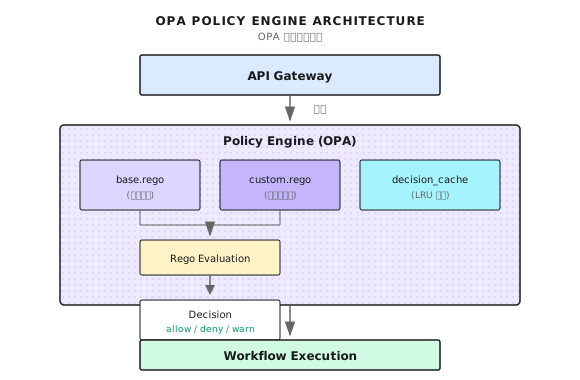
核心组件
| 组件 | 职责 |
|---|---|
| OPAEngine | 策略加载、编译、评估的主入口 |
| PolicyInput | 评估的上下文数据(用户、查询、预算等) |
| Decision | 评估结果(allow/deny + 原因) |
| base.rego | 基础安全策略(默认拒绝、deny 优先) |
24.3 OPAEngine 实现
Engine 接口
Shannon 的 OPA Engine 设计参考 go/orchestrator/internal/policy/ 目录:
type Engine interface {
    Evaluate(ctx context.Context, input *PolicyInput) (*Decision, error)
    LoadPolicies() error
    IsEnabled() bool
    Environment() string
    Mode() Mode
}
简单的接口背后,藏着几个关键设计决策:
- 预编译:策略在启动时编译,评估时直接执行
- 缓存:相同输入的决策结果被缓存
- 模式切换:支持 off/dry-run/enforce 三种模式
核心数据结构
// ========== PolicyInput:评估上下文 ==========
type PolicyInput struct {
    SessionID   string    `json:"session_id"`        // 会话标识
    UserID      string    `json:"user_id"`           // 用户标识
    AgentID     string    `json:"agent_id"`          // Agent 标识
    Query       string    `json:"query"`             // 请求内容
    Mode        string    `json:"mode"`              // simple/standard/complex
    Environment string    `json:"environment"`       // dev/staging/prod(关键:区分环境宽严度)
    TokenBudget int       `json:"token_budget"`      // 预算限制
    Timestamp   time.Time `json:"timestamp"`
}

// ========== Decision:评估结果 ==========
type Decision struct {
    Allow           bool              `json:"allow"`            // 是否允许
    Reason          string            `json:"reason"`           // 决策原因
    RequireApproval bool              `json:"require_approval"` // 需要人工确认(allow but confirm)
    PolicyVersion   string            `json:"policy_version"`   // 策略版本 hash(审计用)
    AuditTags       map[string]string `json:"audit_tags"`       // 审计标签
}
Environment 字段让你可以写出"开发环境宽松、生产环境严格"的策略。RequireApproval 支持"允许但需人工确认"的场景。
24.4 策略加载与编译
以下代码展示了策略加载的核心流程,参考 Shannon 的实现:
func (e *OPAEngine) LoadPolicies() error {
    if !e.config.Enabled {
        return nil
    }

    policies := make(map[string]string)

    // 递归加载所有 .rego 文件
    err := filepath.Walk(e.config.Path, func(path string, info os.FileInfo, err error) error {
        if err != nil {
            return err
        }

        if !info.IsDir() && strings.HasSuffix(info.Name(), ".rego") {
            content, err := os.ReadFile(path)
            if err != nil {
                return fmt.Errorf("failed to read policy file %s: %w", path, err)
            }

            relPath, _ := filepath.Rel(e.config.Path, path)
            moduleName := strings.TrimSuffix(relPath, ".rego")
            policies[moduleName] = string(content)

            e.logger.Debug("Loaded policy file",
                zap.String("path", path),
                zap.String("module", moduleName),
            )
        }
        return nil
    })

    if err != nil {
        return fmt.Errorf("failed to walk policy directory: %w", err)
    }

    // 预编译策略
    regoOptions := []func(*rego.Rego){
        rego.Query("data.shannon.task.decision"),
    }

    for moduleName, content := range policies {
        regoOptions = append(regoOptions, rego.Module(moduleName, content))
    }

    regoBuilder := rego.New(regoOptions...)
    compiled, err := regoBuilder.PrepareForEval(context.Background())
    if err != nil {
        return fmt.Errorf("failed to compile policies: %w", err)
    }

    e.compiled = &compiled

    // 记录策略版本用于审计
    versionHash := e.calculatePolicyVersion(policies)
    RecordPolicyVersion(e.config.Path, versionHash, loadTimestamp)

    return nil
}
关键设计点:
- 递归加载:支持 policies/ 目录下的子目录,方便组织不同领域的策略
- 预编译:使用
PrepareForEval而不是每次评估都编译,性能提升 10x+ - 版本追踪:计算策略内容的 hash,便于审计"这个决策用的是哪个版本的策略"
24.5 策略评估流程
评估流程是 OPA Engine 的核心,以下展示了完整的评估逻辑:
func (e *OPAEngine) Evaluate(ctx context.Context, input *PolicyInput) (*Decision, error) {
    startTime := time.Now()

    defaultDecision := &Decision{
        Allow:  !e.config.FailClosed,
        Reason: "policy engine disabled or no policies loaded",
    }

    if !e.enabled || e.compiled == nil {
        return defaultDecision, nil
    }

    // 先查缓存
    if d, ok := e.cache.Get(input); ok {
        RecordCacheHit(string(e.config.Mode))
        return d, nil
    }

    RecordCacheMiss(string(e.config.Mode))

    // 转换输入为 map
    inputMap, err := e.inputToMap(input)
    if err != nil {
        if e.config.FailClosed {
            return &Decision{Allow: false, Reason: "input conversion failed"}, err
        }
        return defaultDecision, nil
    }

    // 评估策略
    results, err := e.compiled.Eval(ctx, rego.EvalInput(inputMap))
    if err != nil {
        RecordError("policy_evaluation", string(e.config.Mode))
        if e.config.FailClosed {
            return &Decision{Allow: false, Reason: "policy evaluation error"}, err
        }
        return defaultDecision, nil
    }

    // 解析结果
    decision := e.parseResults(results, input)

    // 应用灰度模式
    effectiveMode := e.determineEffectiveMode(input)
    decision = e.applyModeToDecision(decision, effectiveMode, input)

    // 记录指标和审计日志
    duration := time.Since(startTime)
    e.recordComprehensiveMetrics(input, decision, effectiveMode, duration)

    // 写入缓存
    e.cache.Set(input, decision)
    return decision, nil
}这里有个关键概念:FailClosed vs FailOpen。
| 模式 | OPA 出错时的行为 | 适用场景 |
|---|---|---|
| FailClosed | 拒绝请求 | 安全敏感系统 |
| FailOpen | 放行请求 | 可用性优先系统 |
生产环境我建议用 FailOpen + 告警,而不是 FailClosed。原因是:策略引擎挂了导致整个系统不可用,比放过几个请求更糟糕。当然,这要结合你的业务场景判断。
决策缓存
相同输入的决策结果应该被缓存。关键是设计好缓存键:
type decisionCache struct {
    cap    int
    ttl    time.Duration
    mu     sync.Mutex
    list   *list.List
    m      map[string]*list.Element
    hits   int64
    misses int64
}

func (c *decisionCache) makeKey(input *PolicyInput) string {
    h := fnv.New64a()
    h.Write([]byte(strings.ToLower(input.Query)))
    qh := h.Sum64()
    comp := fmt.Sprintf("%.2f", input.ComplexityScore)
    return fmt.Sprintf("%s|%s|%s|%s|%d|%s|%x",
        input.Environment, input.Mode, input.UserID,
        input.AgentID, input.TokenBudget, comp, qh,
    )
}
缓存键设计的考量:
- 包含环境:同一请求在 dev 和 prod 可能有不同决策
- 查询 hash 化:避免 key 过长
- 复杂度保留 2 位小数:减少因浮点精度导致的 key 变化
24.6 Rego 策略编写
Shannon 的基础策略参考 config/opa/policies/base.rego。核心设计原则:默认拒绝,deny 优先。
基础结构与环境区分
package shannon.task
import future.keywords.in

# ========== 默认拒绝(最重要)==========
default decision := {"allow": false, "reason": "default deny - no matching rule"}

# Deny 规则优先于所有 allow 规则
decision := {"allow": false, "reason": reason} { some reason; deny[reason] }

# ========== 环境区分 ==========
# 开发环境:宽松(但仍有预算限制)
decision := {"allow": true, "reason": "dev environment"} {
    input.environment == "dev"
    input.token_budget <= 10000
}
# 生产环境:严格(需要用户白名单 + 无可疑查询)
decision := {"allow": true, "reason": "authorized user"} {
    input.environment == "prod"
    allowed_users[input.user_id]
    input.token_budget <= 5000
    not suspicious_query
}
为什么默认拒绝?默认允许意味着你必须预见所有危险情况;默认拒绝只需列出已知安全的情况,未知情况自动拒绝。
用户管理与查询模式匹配
# ========== 用户白名单/黑名单 ==========
allowed_users := {"admin", "orchestrator", "shannon_system", "api_user"}
privileged_users := {"admin", "shannon_system", "security_admin"}
blocked_users := {"blocked_user", "suspended_account"}

# ========== 查询模式分级 ==========
safe_patterns := {"what is", "how to", "explain", "summarize"}  # 安全
suspicious_patterns := {"delete", "hack", "bypass", "admin", "sudo"}  # 可疑
dangerous_patterns := {"rm -rf", "drop table", "/etc/passwd", "api key"}  # 危险

suspicious_query { count([p | suspicious_patterns[p]; contains(lower(input.query), p)]) > 0 }
dangerous_query { count([p | dangerous_patterns[p]; contains(lower(input.query), p)]) > 0 }
Deny 规则(最高优先级)
# 危险查询模式
deny[sprintf("dangerous: %s", [p])] { dangerous_patterns[p]; contains(lower(input.query), p) }
# 超出预算限制
deny[sprintf("budget %d exceeds max %d", [input.token_budget, 50000])] { input.token_budget > 50000 }
# 被封禁用户
deny[sprintf("user %s blocked", [input.user_id])] { blocked_users[input.user_id] }
# 生产环境未授权用户
deny["unauthorized user in prod"] {
    input.environment == "prod"; input.user_id != ""
    not allowed_users[input.user_id]; not privileged_users[input.user_id]
}
预算限制
max_budgets := {"simple": 1000, "standard": 5000, "complex": 15000}
system_limits := {"max_tokens": 50000, "max_concurrent_requests": 20}

decision := {"allow": false, "reason": sprintf("budget %d exceeds max %d for %s",
    [input.token_budget, max_budgets[input.mode], input.mode])} {
    max_budgets[input.mode] < input.token_budget
}
24.7 执行模式与灰度发布
OPA 最有价值的功能之一:安全地发布新策略。
| 模式 | 策略评估 | 实际阻断 | 记录日志 | 用途 |
|---|---|---|---|---|
| off | 否 | 否 | 否 | 维护模式 |
| dry-run | 是 | 否 | 是 | 测试新策略 |
| enforce | 是 | 是 | 是 | 正式执行 |
模式与灰度配置
// ========== 执行模式 ==========
type Mode string
const (
    ModeOff     Mode = "off"      // 策略禁用
    ModeDryRun  Mode = "dry-run"  // 只记录不执行
    ModeEnforce Mode = "enforce"  // 强制执行
)

// ========== Canary 灰度配置 ==========
type CanaryConfig struct {
    Enabled           bool     `yaml:"enabled"`
    EnforcePercentage int      `yaml:"enforce_percentage"` // 0-100%
    EnforceUsers      []string `yaml:"enforce_users"`      // 白名单用户
    DryRunUsers       []string `yaml:"dry_run_users"`      // 强制 dry-run 的用户
}

// ========== 确定有效模式(优先级:紧急开关 > 显式用户 > 百分比)==========
func (e *OPAEngine) determineEffectiveMode(input *PolicyInput) Mode {
    if e.config.EmergencyKillSwitch { return ModeDryRun }  // 紧急开关覆盖一切
    if !e.config.Canary.Enabled { return e.config.Mode }
    // 显式 dry-run/enforce 用户检查
    for _, u := range e.config.Canary.DryRunUsers { if input.UserID == u { return ModeDryRun } }
    for _, u := range e.config.Canary.EnforceUsers { if input.UserID == u { return ModeEnforce } }
    // 基于百分比灰度
    if e.config.Canary.EnforcePercentage > 0 {
        if int(hash(input.UserID) % 100) < e.config.Canary.EnforcePercentage { return ModeEnforce }
    }
    return ModeDryRun
}

// ========== Dry-Run 处理:评估但不阻断 ==========
func (e *OPAEngine) applyModeToDecision(decision *Decision, mode Mode) *Decision {
    if mode == ModeDryRun && !decision.Allow {
        decision.Allow = true  // 强制放行
        decision.Reason = "DRY-RUN: would have denied - " + decision.Reason
    }
    return decision
}
灰度发布流程:写新策略 → 部署为 dry-run → 观察日志一周 → 逐步提高 enforce 比例 → 全量 enforce
24.8 配置与部署
完整配置
# config/shannon.yaml
policy:
  enabled: true
  path: "/app/config/opa/policies"
  mode: "dry-run"  # off, dry-run, enforce
  environment: "prod"

  fail_closed: false  # 失败时:true=拒绝, false=放行

  emergency_kill_switch: false  # 强制 dry-run

  cache:
    enabled: true
    size: 1000
    ttl: "5m"

  canary:
    enabled: true
    enforce_percentage: 10  # 10% 的请求会被 enforce
    enforce_users:
      - "admin"
      - "senior_engineer"
    enforce_agents:
      - "synthesis-agent"
    dry_run_users:
      - "test_user"
策略热更新
Shannon 支持不重启服务更新策略:
# 1. 修改策略文件
vim config/opa/policies/custom.rego

# 2. 触发重载 (发送 SIGHUP)
docker compose exec orchestrator kill -HUP 1

# 3. 验证加载
docker compose logs orchestrator | grep "Policies loaded"
策略测试
上线前一定要测试。OPA 提供了命令行工具:
# 使用 OPA CLI 测试
opa eval --bundle config/opa/policies \
  --input test/policy_input.json \
  --data config/opa/policies \
  'data.shannon.task.decision'
测试输入样例:
{
  "user_id": "test_user",
  "query": "help me understand machine learning",
  "mode": "simple",
  "token_budget": 500,
  "environment": "dev"
}
24.9 监控与审计
关键指标
| 指标 | 类型 | 说明 |
|---|---|---|
policy_evaluations_total | Counter | 策略评估次数 |
policy_evaluation_duration_seconds | Histogram | 评估耗时 |
policy_decisions_total{decision} | Counter | 按决策类型计数 |
policy_cache_hits_total | Counter | 缓存命中 |
policy_deny_reasons_total{reason} | Counter | 按拒绝原因计数 |
审计日志
每次策略评估都应该记录日志:
{
  "timestamp": "2024-01-15T10:30:00Z",
  "event": "policy_evaluation",
  "user_id": "developer_1",
  "session_id": "sess-abc123",
  "query_hash": "a1b2c3d4",
  "decision": "deny",
  "reason": "dangerous pattern detected: drop table",
  "effective_mode": "enforce",
  "policy_version": "abc123ef",
  "duration_ms": 2.5
}
关键字段:
- query_hash:查询内容的 hash,不记录原文(隐私考虑)
- policy_version:策略文件的 hash,便于追溯"这个决策用的是哪个版本"
- effective_mode:实际执行模式(考虑灰度配置后的)
告警规则
- alert: HighPolicyDenyRate
  expr: |
    sum(rate(policy_decisions_total{decision="deny"}[5m])) /
    sum(rate(policy_decisions_total[5m])) > 0.1
  for: 5m
  labels:
    severity: warning
  annotations:
    summary: "High policy deny rate (> 10%)"

- alert: PolicyEvaluationSlow
  expr: histogram_quantile(0.95, policy_evaluation_duration_seconds) > 0.05
  for: 5m
  labels:
    severity: warning
  annotations:
    summary: "Policy evaluation P95 latency > 50ms"
24.10 常见的坑
| 坑 | 问题 | 解决方案 |
|---|---|---|
| 忘记默认拒绝 | 未匹配规则时返回 undefined(被解释为允许) | 显式定义 default decision |
| Deny 优先级 | allow 规则可能绕过 deny | 使用 deny 集合 + count(deny)==0 检查 |
| 缓存键不完整 | 字段变化返回错误缓存结果 | 包含所有影响决策的字段 |
| 忽略编译错误 | 策略语法错误导致行为不确定 | 显式处理错误,决定 fail-open/closed |
# ========== 坑 1:忘记默认拒绝 ==========
decision := {"allow": true} { input.mode == "simple" }  # 错误:无 default
default decision := {"allow": false, "reason": "no match"}  # 正确

# ========== 坑 2:Deny 优先级 ==========
decision := {"allow": true} { ... }                        # 错误:可能绕过 deny
decision := {"allow": false} { dangerous_query }
# 正确:deny 集合优先检查
deny["dangerous"] { dangerous_query }
decision := {"allow": false, "reason": r} { some r; deny[r] }
decision := {"allow": true, ...} { count(deny) == 0; ... }
// ========== 坑 3:缓存键不完整 ==========
return fmt.Sprintf("%s|%s", input.UserID, input.Mode) // 错误:缺少 Environment 等
return fmt.Sprintf("%s|%s|%s|%s|%d|%s", // 正确:包含所有影响决策的字段
input.Environment, input.Mode, input.UserID, input.AgentID, input.TokenBudget, queryHash)
// ========== 坑 4:忽略编译错误 ==========
compiled, _ := regoBuilder.PrepareForEval(ctx) // 错误:忽略错误
compiled, err := regoBuilder.PrepareForEval(ctx) // 正确:显式处理
if err != nil {
if failClosed { return nil, err } // FailClosed:拒绝所有
e.enabled = false // FailOpen:禁用策略引擎
}24.11 框架对比
OPA 不是唯一的策略引擎。其他框架怎么做权限控制?
| 框架 | 策略机制 | 热更新 | 灰度发布 | 审计日志 |
|---|---|---|---|---|
| Shannon + OPA | 声明式 Rego | 支持 | 内置 Canary | 完整 |
| LangChain | 无内置 | N/A | 需自己实现 | 需自己实现 |
| LangGraph | Callback | 需重启 | 需自己实现 | 需自己实现 |
| CrewAI | 无内置 | N/A | N/A | N/A |
| Kubernetes | OPA Gatekeeper | 支持 | 支持 | 完整 |
OPA 的优势在于它是一个通用的策略引擎,不只是为 Agent 系统设计。你可以用同一套技术栈管理 Kubernetes 准入控制、API 网关授权、微服务访问控制。
这章说了什么
- 默认拒绝:始终定义
default decision为拒绝,安全第一 - Deny 优先:使用
deny集合实现拒绝规则优先,避免绕过 - 灰度发布:先 dry-run 验证,再按百分比灰度上线
- 决策缓存:LRU 缓存减少评估开销,注意缓存键设计
- 完整审计:记录每次决策的原因和策略版本
Shannon Lab(10 分钟上手)
本节帮你在 10 分钟内把本章概念对应到 Shannon 源码。
必读(1 个文件)
config/opa/policies/base.rego:看default decision的定义位置理解"默认拒绝"、deny集合的用法、dangerous_patterns集合的查询模式匹配设计
选读深挖(2 个,按兴趣挑)
go/orchestrator/internal/policy/engine.go(如果存在):理解 OPA Engine 的初始化和评估流程,看LoadPolicies和Evaluate函数- OPA Playground(https://play.openpolicyagent.org/):在线测试 Rego 策略,把 base.rego 复制过去用不同的 input 测试
练习
练习 1:设计一条新策略
场景:产品要求"非工作时间(22:00-08:00)禁止复杂任务"。写出对应的 Rego 规则,要求:
- 使用
input.timestamp字段 - 只影响
mode == "complex"的任务 - 提供清晰的拒绝原因
练习 2:源码理解
读 Shannon 的 config/opa/policies/base.rego:
- 如果一个请求同时匹配
allowed_users和dangerous_query,最终会被允许还是拒绝?为什么? safe_query_check规则的作用是什么?如果删掉它会怎样?
练习 3(进阶):设计灰度发布计划
你写了一条新的 deny 规则,需要上线到生产环境。设计一个灰度发布计划,包括:
- 第一周做什么(提示:dry-run)
- 如何确认新规则不会误杀正常请求
- 如何回滚如果出问题
进一步阅读
- OPA 官方文档:https://www.openpolicyagent.org/docs - Rego 语法和最佳实践
- Rego Playground:https://play.openpolicyagent.org/ - 在线测试策略
- OPA 与 Kubernetes:https://www.openpolicyagent.org/docs/latest/kubernetes-introduction/ - 如果你也用 K8s,可以复用同一套策略技能
下一章预告
OPA 解决了"谁能做什么"的问题。但还有一个问题:工具执行安全吗?
一个 Agent 调用了一个 Python 脚本。这个脚本会不会:
- 读取敏感文件?
- 发起网络请求泄露数据?
- 消耗大量 CPU/内存拖垮系统?
- 执行恶意代码?
这些问题,OPA 管不了。你需要沙箱。
下一章我们来聊 WASI 沙箱安全执行——用 WebAssembly 隔离工具执行,防止恶意代码逃逸。
第 25 章见。